自在学
分类课程智能体订阅
分类课程AI导师价格
课程进度
16 / 20
上一节文本下一节变换
自在学

© 2025 - 2026 自在学,保留所有权利。

公网安备湘公网安备43020302000292号 | 湘ICP备2025148919号-1

关于我们隐私政策使用条款

© 2025 自在学,保留所有权利。

公网安备湘公网安备43020302000292号湘ICP备2025148919号-1

编程CSS样式设计列表与内容

列表与内容

在网页设计领域,列表远不只是用来罗列信息的工具。它们还是内容结构化与视觉层次的重要载体。通过合理而专业的CSS设计,我们不仅可以美化列表的外观,还能提升用户体验,让原本单调的数据展现出丰富的视觉吸引力。


实验室


列表样式

提到网页中的列表,很多人第一反应会想到那些带有圆点或数字的排列文本。但从CSS的专业视角来看,列表的作用远超这一层含义。每个列表项不仅仅属于一个集合,它同时也是一个可独立定制的视觉模块。 借助CSS,我们能够精确地调整每一项的展示方式,从字体、颜色到标记形式,乃至列表整体的间距、层次,实现真正量身定制的视觉效果。

标记类型的选择

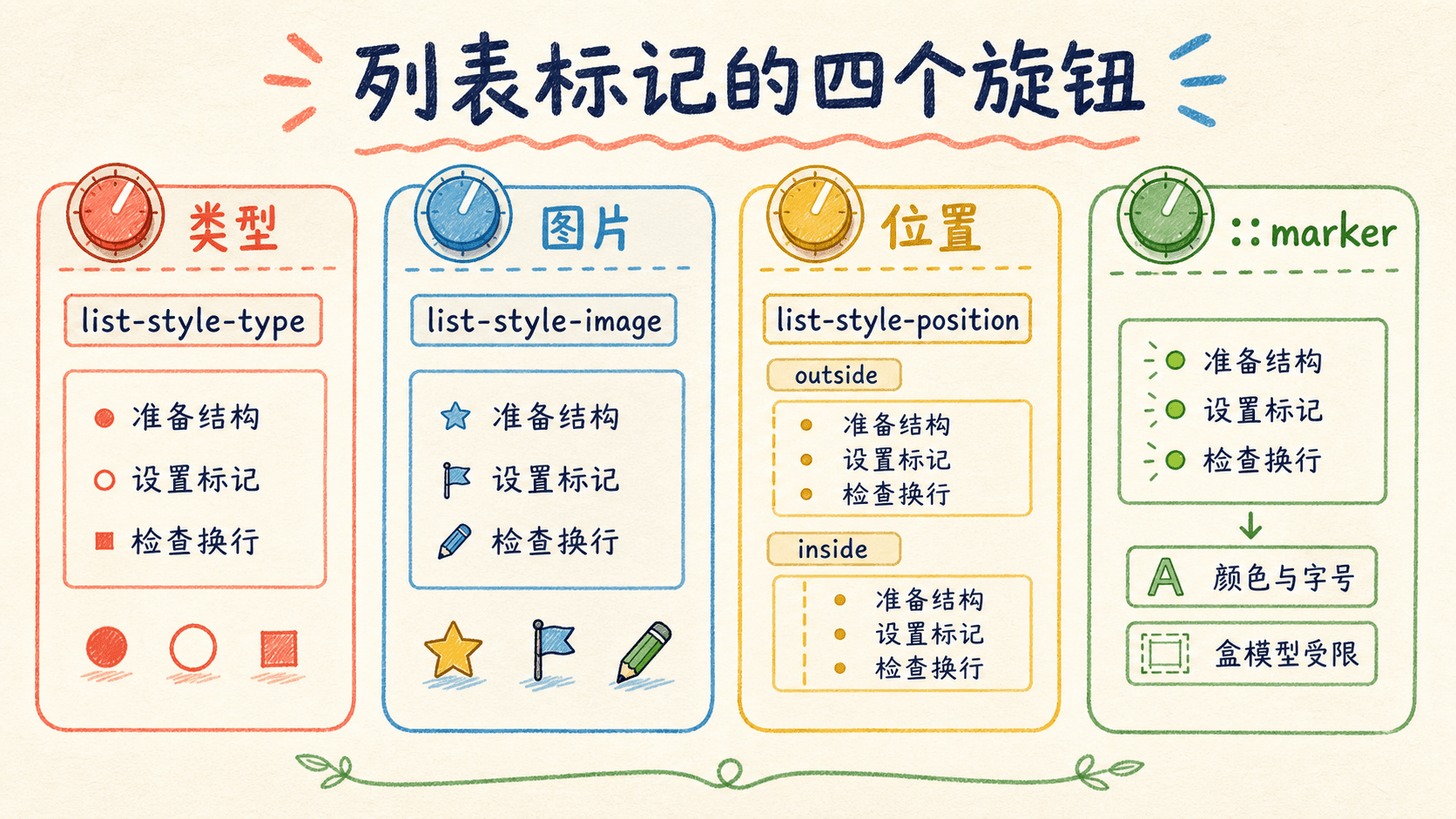
列表标记(marker)是列表内容与视觉效果之间的纽带。专业的CSS为开发者提供了丰富的标记类型,每种样式都适应特定的设计需求。比如,默认情况下,无序列表(ul)使用实心圆点,而有序列表(ol)则采用阿拉伯数字顺序编号。 这些基础样式虽然实用,但在现代网页设计中往往显得过于单一。为满足复杂多样的展示需求,CSS允许我们灵活更换标记类型(如方块、圆圈、字母、罗马数字等),甚至可以利用自定义符号和图片,让列表焕发全新的视觉活力。 专业的标记设计不仅增强了页面的美观性,还能帮助用户更高效地理解内容结构。

html
<!DOCTYPE html>
<html>
  <head>
    <style>
      .custom-list {
        list-style-type: square;
        font-family: 'Arial', sans-serif;
        padding-left: 20px;
      }
      .custom-list li {
        margin-bottom: 8px;
        line-height: 1.6;
      }
    </style>
  </head>
  <body>
    <ul class="custom-list">
      <li>这是一个自定义样式的列表项</li>
      <li>每个项目都使用了方块标记</li>
      <li>通过样式控制,我们可以创造独特的视觉效果</li>
    </ul>
  </body>
</html>

在上述例子中,我们通过设置list-style-type: square;属性,将默认的圆点标记更改为方块标记。list-style-type是CSS中专门用于控制无序列表(ul)或有序列表(ol)项目符号或编号样式的属性。 它支持多种预设类型,比如 disc(圆点)、circle(空心圆)、square(方块)等。与默认的黑色圆点相比,方块标记更加醒目,能够有效提升内容的可读性和层次感。


使用图像作为列表标记(List Marker Images)

在实际网页设计中,仅依靠常规的文字或符号标记有时难以满足个性化和品牌化的需求。此时,我们可以借助list-style-image属性将任何图片用作列表项的标记。这种做法不仅能让列表自然地融入页面的整体风格,更能将品牌色彩、Logo、特色图形巧妙地体现在每一项内容之前。例如,你可以用企业LOGO、品牌主色圆点或独特的SVG图形作为标记,这样用户在浏览时会第一时间注意到视觉上的“统一感”和“专业感”。

具体实现时,只需为ul、ol或li元素设置list-style-image: url(...);属性,浏览器就会用指定图片取代默认的列表符号

html
<!DOCTYPE html>
<html>
  <head>
    <style>
      .image-list {
        list-style-image: url('data:image/svg+xml;base64,PHN2ZyB3aWR0aD0iMjAiIGhlaWdodD0iMjAiIHZpZXdCb3g9IjAgMCAyMCAyMCIgZmlsbD0ibm9uZSIgeG1sbnM9Imh0dHA6Ly93d3cudzMub3JnLzIwMDAvc3ZnIj4KPGNpcmNsZSBjeD0iMTAiIGN5PSIxMCIgcj0iOCIgZmlsbD0iIzMzNzNkZiIvPgo8L3N2Zz4K');
        padding-left: 30px;
      }
      .image-list li {
        margin-bottom: 10px;
        padding-left: 5px;
      }
    </style>
  </head>
  <body>
    <ul class="image-list">
      <li>蓝色圆点图像标记</li>
      <li>创造视觉一致性</li>
      <li>增强品牌识别</li>
    </ul>
  </body>
</html>

在上面的例子中,我们利用SVG格式的图像作为自定义列表的标记,并通过base64编码将其内容直接嵌入到CSS中。这样做能够彻底避免对外部图片资源的依赖,实现样式与结构的高度集成。

控制列表标记的位置

列表项标记(marker)的具体位置会直接影响页面的排版与美观。在实际设计中,如果将标记置于内容区域之内,可以进一步压缩元素间的空间,让页面看起来更加紧凑简洁;而将标记设置在列表项外部,则有助于增强内容的层次分明,为用户带来更为清晰的阅读体验。根据不同设计需求,可以灵活选择合适的标记位置以优化整体布局效果。

html
<!DOCTYPE html>
<html>
  <head>
    <style>
      .outside-marker {
        list-style-position: outside;
        background-color: #f0f0f0;
        padding: 10px;
        border-radius: 5px;
      }
      .inside-marker {
        list-style-position: inside;
        background-color: #e8f4f8;
        padding: 10px;
        border-radius: 5px;
        margin-top: 20px;
      }
      li {
        margin-bottom: 5px;
      }
    </style>
  </head>
  <body>
    <h3>外部标记位置</h3>
    <ul class="outside-marker">
      <li>标记位于内容框外部</li>
      <li>提供更好的视觉对齐</li>
      <li>适合传统列表布局</li>
    </ul>
 
    <h3>内部标记位置</h3>
    <ul class="inside-marker">
      <li>标记嵌入到内容中</li>
      <li>创造紧凑的视觉效果</li>
      <li>适合现代简洁设计</li>
    </ul>
  </body>
</html>

通过这个对比,我们可以清楚地看到两种标记位置的区别。外部标记保持了传统列表的视觉习惯,而内部标记则创造出更加现代和紧凑的布局效果。

样式属性的整合

为了提高代码的可维护性,CSS提供了list-style这个简写属性,它允许我们在一行代码中同时设置标记类型、图像和位置。这种整合的方式不仅让代码更加简洁,也便于统一管理列表的整体样式。

html
<!DOCTYPE html>
<html>
  <head>
    <style>
      .integrated-style {
        list-style: circle inside;
        background-color: #fff8e1;
        padding: 15px;
        border-left: 4px solid #ffb74d;
      }
      .integrated-style li {
        margin-bottom: 8px;
        color: #e65100;
      }
    </style>
  </head>
  <body>
    <ul class="integrated-style">
      <li>使用简写属性整合样式</li>
      <li>圆形标记位于内部</li>
      <li>统一的视觉设计语言</li>
      <li>提高代码可维护性</li>
    </ul>
  </body>
</html>

这里我们通过list-style: circle inside这一简洁写法,能够一次性地定义列表标记的形状为圆形,并将其放置在内容内侧。

设计列表样式时,建议充分考虑内容本身的结构和层级,合理选取标记类型和位置。恰当的视觉层次划分与标记规范,不仅能优化信息的展示,还能帮助阅读者更快地把握页面内容。


标记控制

虽然常规的列表样式属性可以满足基础需求,但在实际开发过程中,我们常常遇到需要自定义细节的场景。此时,::marker伪元素便可以发挥重要作用。它允许我们针对列表项前的标记符号单独设置样式,从而赋予每个列表标记独特的外观,使整体设计更具个性与识别度。

标记样式的用法

借助::marker伪元素,我们可以为列表前的标记定制颜色、字体大小和样式等属性。

html
<!DOCTYPE html>
<html>
  <head>
    <style>
      .styled-markers {
        font-family: 'Georgia', serif;
        padding-left: 25px;
      }
      .styled-markers li:nth-child(1)::marker {
        color: #d32f2f;
        font-weight: bold;
      }
      .styled-markers li:nth-child(2)::marker {
        font-size: 1.5em;
        color: #1976d2;
      }
      .styled-markers li:nth-child(3)::marker {
        font-style: italic;
        color: #388e3c;
      }
      li {
        margin-bottom: 12px;
        line-height: 1.6;
      }
    </style>
  </head>
  <body>
    <ul class="styled-markers">
      <li>红色粗体标记,突出重要信息</li>
      <li>放大字号的蓝色标记,增强视觉层次</li>
      <li>斜体绿色标记,创造优雅的设计感</li>
    </ul>
  </body>
</html>

在这个示例中,我们为每个列表项的标记应用了不同的样式。通过::marker伪元素,我们可以精确控制标记的视觉表现,让它们不再是单调的装饰,而是设计中的重要组成部分。

虽然::marker伪元素为我们提供了样式化的能力,但它并非万能的。我们需要了解它的限制,以便在设计时做出合适的选择。目前,::marker支持的属性相对有限,主要集中在文本和字体相关的属性上。

虽然::marker伪元素功能强大,但我们应该谨慎使用它的高级特性。并非所有浏览器都完全支持这些样式属性,在使用前最好进行兼容性测试。


生成内容

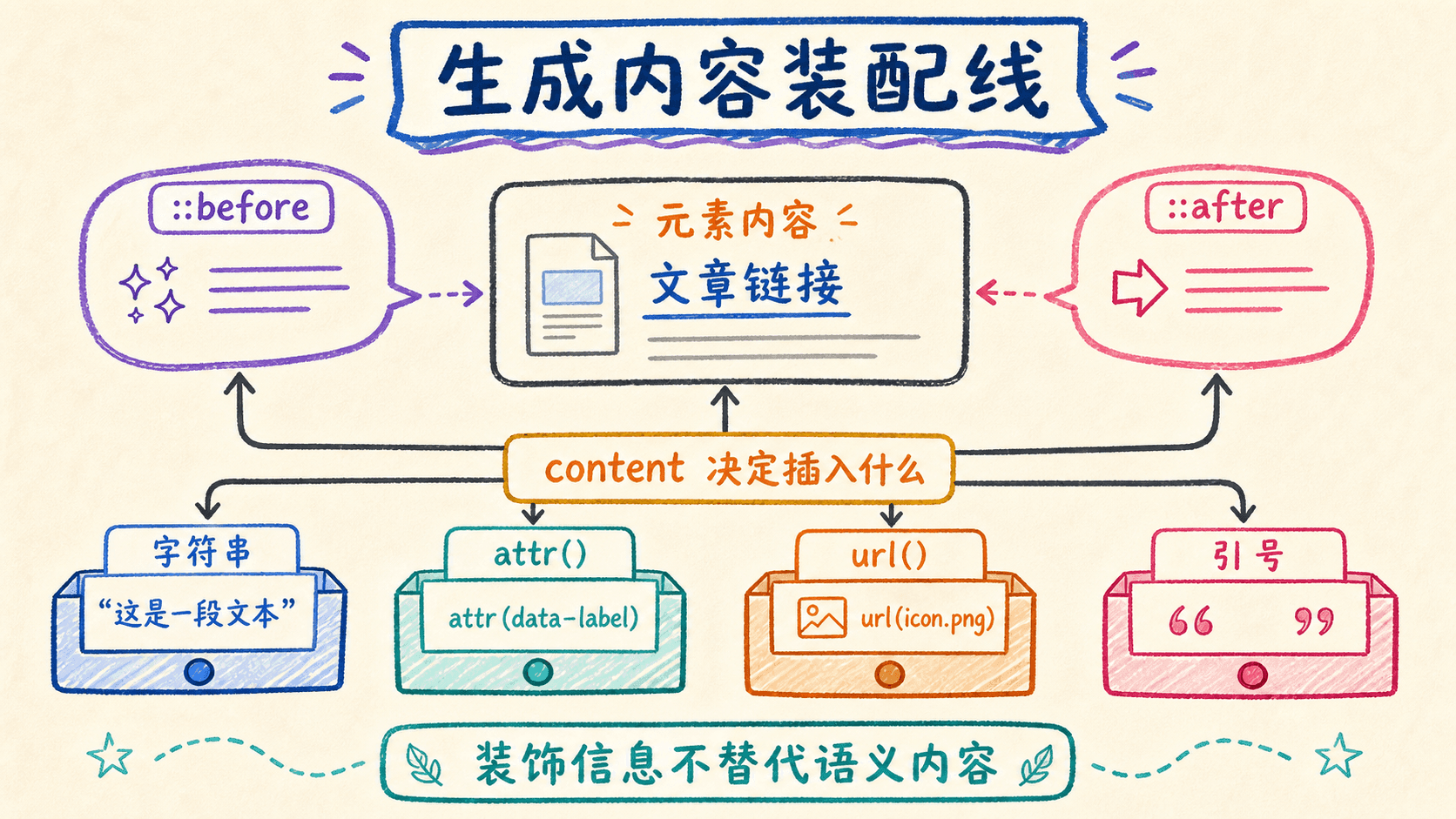
在网页设计的领域中,我们有时需要在现有的HTML结构基础上添加一些额外的视觉元素或信息,但又不想修改HTML标记本身。这时,CSS的生成内容功能就成为了我们的救星。通过::before和::after伪元素,我们可以在元素的内容前后插入新的内容,实现更加丰富的视觉表现。

基础内容的插入

生成内容最基本的用法是在元素的特定位置插入文本或符号。这种技术特别适用于需要在多个地方重复出现的小装饰元素,或者为特定类型的链接添加标识。

html
<!DOCTYPE html>
<html>
  <head>
    <style>
      .article-content {
        font-family: 'SimSun', serif;
        line-height: 1.8;
        max-width: 600px;
        margin: 0 auto;
        padding: 20px;
      }
      .article-content h2::before {
        content: "📖 ";
        color: #1976d2;
      }
      .article-content p::first-letter {
        font-size: 2em;
        font-weight: bold;
        color: #d32f2f;
        float: left;
        margin-right: 5px;
        line-height: 0.8;
      }
      .article-content blockquote::before {
        content: '"';
        font-size: 3em;
        color: #666;
        position: absolute;
        margin-top: -10px;
        margin-left: -20px;
      }
      .article-content blockquote {
        position: relative;
        padding-left: 40px;
        font-style: italic;
        border-left: 3px solid #ccc;
        margin: 20px 0;
      }
    </style>
  </head>
  <body>
    <div class="article-content">
      <h2>阅读的艺术</h2>
      <p>书籍是人类智慧的结晶,每一页都蕴含着深刻的哲理。阅读不仅能够开阔我们的视野,还能丰富我们的内心世界。</p>
      <blockquote>书籍是人类进步的阶梯</blockquote>
      <p>在数字时代,书籍的价值愈发凸显。它不仅承载着知识,更承载着文化的传承。</p>
    </div>
  </body>
</html>

在这个例子中,我们看到了生成内容的多种应用场景。标题前添加了书籍图标,首字母进行了特殊的样式化处理,引用部分添加了大号的引号符号。这些都是通过::before伪元素实现的,让页面内容更加丰富和有层次感。

动态内容的生成

生成内容不仅可以是静态的文本,还可以包含动态的信息,比如元素的属性值。这种技术在创建链接提示、显示元数据等场景中特别有用。

html
<!DOCTYPE html>
<html>
  <head>
    <style>
      .resource-links {
        font-family: 'Arial', sans-serif;
        max-width: 500px;
        margin: 20px auto;
        padding: 20px;
        background-color: #f9f9f9;
        border-radius: 8px;
      }
      .resource-links a {
        display: block;
        margin-bottom: 15px;
        padding: 10px;
        background-color: white;
        border-radius: 4px;
        text-decoration: none;
        color: #333;
        border: 1px solid #ddd;
        transition: all 0.3s ease;
      }
      .resource-links a:hover {
        box-shadow: 0 2px 8px rgba(0,0,0,0.1);
        border-color: #1976d2;
      }
      .resource-links a[href$=".pdf"]::after {
        content: " (PDF文档,大小:" attr(data-size) ")";
        color: #666;
        font-size: 0.9em;
      }
      .resource-links a[href^="http"]::before {
        content: "🌐 ";
        margin-right: 5px;
      }
      .resource-links a[href*="github"]::before {
        content: "🐙 ";
        margin-right: 5px;
      }
    </style>
  </head>
  <body>
    <div class="resource-links">
      <h3>学习资源下载</h3>
      <a href="https://github.com/example/tutorial" data-size="2.3MB">GitHub教程</a>
      <a href="https://example.com/guide.pdf" data-size="1.8MB">使用指南</a>
      <a href="https://example.com/reference.pdf" data-size="5.2MB">参考手册</a>
    </div>
  </body>
</html>

这个例子展示了如何使用attr()函数来获取元素的属性值并显示在生成内容中。PDF链接后显示了文件大小信息,不同类型的链接前添加了相应的图标。这种动态内容生成让用户在不查看源代码的情况下就能了解链接的详细信息。

引用符号的自动管理

在处理引用内容时,我们经常需要成对的引用符号。CSS提供了专门的机制来自动管理这些引用符号,包括嵌套引用的正确处理。

html
<!DOCTYPE html>
<html>
  <head>
    <style>
      .literature-content {
        font-family: 'Georgia', serif;
        max-width: 700px;
        margin: 0 auto;
        padding: 30px;
        line-height: 1.8;
      }
      .literature-content q {
        quotes: '「' '」' '『' '』';
        font-style: italic;
        color: #555;
      }
      .literature-content q::before {
        content: open-quote;
        color: #d32f2f;
        font-size: 1.2em;
      }
      .literature-content q::after {
        content: close-quote;
        color: #d32f2f;
        font-size: 1.2em;
      }
      .literature-content blockquote {
        margin: 20px 0;
        padding: 15px 20px;
        background-color: #f5f5f5;
        border-left: 4px solid #1976d2;
        font-size: 1.1em;
      }
      .literature-content blockquote::before {
        content: "💭 ";
        font-size: 1.5em;
      }
      .author {
        text-align: right;
        font-weight: bold;
        color: #1976d2;
        margin-top: 10px;
      }
    </style>
  </head>
  <body>
    <div class="literature-content">
      <h2>文学名著赏析</h2>
      <p>在<q>红楼梦</q>中,作者通过<q>满纸荒唐言,一把辛酸泪</q>的诗句,揭示了封建社会的种种弊端。</p>
      <blockquote>
        世事洞明皆学问,人情练达即文章。
      </blockquote>
      <p class="author">—— 曹雪芹</p>
      <p>这部小说不仅展现了贾、史、王、薛四大家族的兴衰,还通过<q>白玉为堂金作马</q>的豪奢生活,批判了封建贵族的腐朽本质。</p>
    </div>
  </body>
</html>

通过设置quotes属性,我们定义了多层嵌套的引用符号。系统会自动根据嵌套层级选择合适的符号,让复杂的引用结构变得清晰易读。

生成内容技术让CSS不再局限于现有HTML结构的样式化。我们可以创造性地使用::before和::after伪元素,为网页添加丰富的视觉元素和实用信息。


计数器

在处理有序内容时,我们往往需要精确的编号系统。CSS的计数器功能为我们提供了一种强大的机制,可以在文档中创建和管理各种类型的编号序列。这种技术不仅适用于传统的有序列表,还可以为标题、代码段落甚至任意元素创建复杂的编号体系。

计数器的基础操作

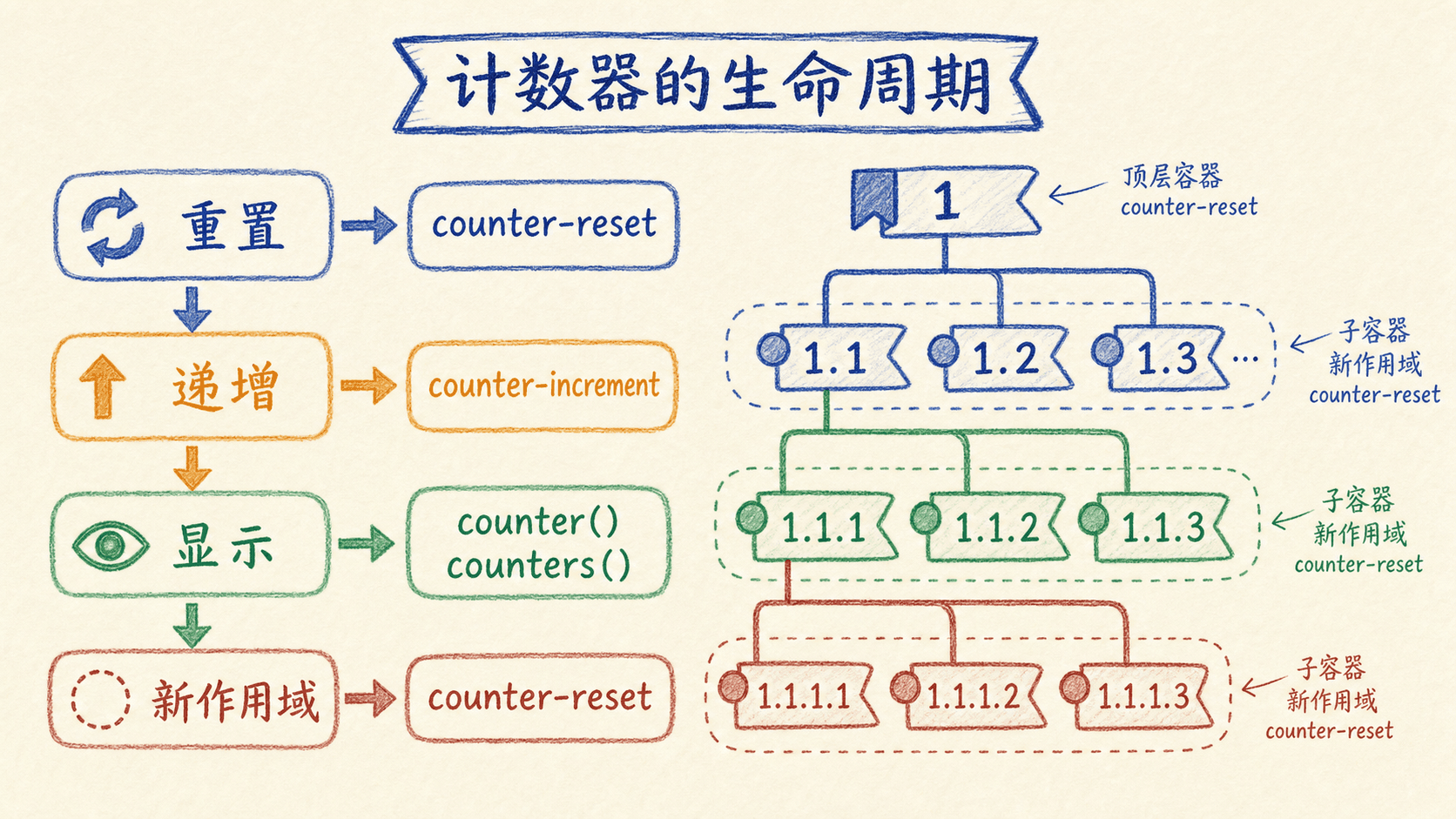
计数器的核心在于两个基本操作:重置计数器的起始值,以及在需要时递增计数器的数值。通过这两个操作,我们可以精确控制编号的生成和显示。

html
<!DOCTYPE html>
<html>
  <head>
    <style>
      .document-structure {
        font-family: 'Arial', sans-serif;
        max-width: 600px;
        margin: 0 auto;
        padding: 20px;
        line-height: 1.6;
      }
      .document-structure h1 {
        counter-reset: chapter;
        background-color: #1976d2;
        color: white;
        padding: 10px 15px;
        margin: 30px 0 15px 0;
        border-radius: 5px;
      }
      .document-structure h1::before {
        content: "第" counter(chapter) "章 ";
        font-weight: bold;
      }
      .document-structure h2 {
        counter-reset: section;
        counter-increment: chapter;
        background-color: #42a5f5;
        color: white;
        padding: 8px 12px;
        margin: 20px 0 10px 0;
        border-radius: 3px;
      }
      .document-structure h2::before {
        content: counter(chapter) "." counter(section) " ";
        font-weight: bold;
      }
      .document-structure h3 {
        counter-increment: section;
        color: #1976d2;
        margin: 15px 0 8px 0;
        border-bottom: 2px solid #e3f2fd;
        padding-bottom: 5px;
      }
      .document-structure h3::before {
        content: counter(chapter) "." counter(section) " ";
        font-weight: bold;
        color: #0d47a1;
      }
      .document-structure p {
        margin-bottom: 15px;
        text-indent: 2em;
      }
    </style>
  </head>
  <body>
    <div class="document-structure">
      <h1>CSS基础概念</h1>
      <p>CSS是网页样式设计的核心技术,通过选择器和属性来控制元素的视觉表现。</p>
 
      <h2>选择器的使用</h2>
      <p>选择器是CSS中用于定位HTML元素的重要机制。</p>
 
      <h3>元素选择器</h3>
      <p>元素选择器直接使用HTML标签名来选择对应的元素。</p>
 
      <h3>类选择器</h3>
      <p>类选择器通过class属性来选择具有特定类的元素。</p>
 
      <h2>样式属性详解</h2>
      <p>CSS提供了丰富的属性来控制元素的各种视觉特性。</p>
 
      <h3>颜色属性</h3>
      <p>color属性用于设置文本的颜色,background-color用于设置背景色。</p>
    </div>
  </body>
</html>

这个例子展示了计数器在文档结构中的应用。我们创建了章、节、小节的三级编号系统,每一级都有其特定的计数器逻辑。通过合理使用counter-reset和counter-increment,我们可以构建出复杂的编号体系。

计数器的显示

计数器的显示不仅仅局限于简单的数字,我们可以通过多种方式来定制计数器的表现形式,包括改变计数样式和组合多个计数器。

html
<!DOCTYPE html>
<html>
  <head>
    <style>
      .program-code {
        font-family: 'Monaco', 'Consolas', monospace;
        background-color: #f5f5f5;
        border: 1px solid #ddd;
        padding: 20px;
        margin: 20px 0;
        border-radius: 5px;
      }
      .program-code pre {
        counter-reset: linenum;
        margin: 0;
        background-color: #2d3748;
        color: #e2e8f0;
        padding: 15px;
        border-radius: 3px;
        overflow-x: auto;
      }
      .program-code pre code {
        display: block;
        line-height: 1.5;
      }
      .program-code pre code::before {
        counter-increment: linenum;
        content: counter(linenum, decimal-leading-zero) ": ";
        color: #718096;
        margin-right: 10px;
        font-weight: bold;
        display: inline-block;
        width: 30px;
        text-align: right;
      }
      .program-code .comment {
        color: #68d391;
        font-style: italic;
      }
      .program-code .keyword {
        color: #4299e1;
        font-weight: bold;
      }
      .program-code .string {
        color: #ed8936;
      }
    </style>
  </head>
  <body>
    <div class="program-code">
      <h3>Python代码示例</h3>
      <pre><code><span class="comment"># 这是一个简单的Python程序</span>
<span class="keyword">def</span> greet(name):
message = <span class="string">"Hello, "</span> + name + <span class="string">"!"</span>
<span class="keyword">return</span> message
 
<span class="comment"># 主程序</span>
<span class="keyword">if</span> __name__ == <span class="string">"__main__"</span>:
result = greet(<span class="string">"世界"</span>)
<span class="keyword">print</span>(result)</code></pre>
    </div>
  </body>
</html>

这里我们看到了计数器在代码展示中的应用。通过decimal-leading-zero计数样式,我们为每一行代码添加了行号。这种带前导零的编号方式让代码行号看起来更加整齐和专业。

计数器的作用域

计数器的作用域(Scope)指的是计数器在HTML文档中起作用的范围和持续时间。通俗来说,它决定了计数器在哪些元素内部是“可见和有效”的。例如,当我们在某个父元素上使用counter-reset初始化计数器时,只有这个父元素及其所有子元素能够读取和操作该计数器。这样做的好处是可以避免编号混乱,实现层级结构上的独立编号体系。 需要注意的是,不同的作用域设置可以帮助我们灵活地控制多层嵌套列表、章节编号等复杂结构中的计数行为,从而让页面的结构和编号更加清晰、专业、有条理。

html
<!DOCTYPE html>
<html>
  <head>
    <style>
      .nested-structure {
        font-family: 'Arial', sans-serif;
        max-width: 650px;
        margin: 0 auto;
        padding: 20px;
      }
      .nested-structure ol {
        counter-reset: item;
        margin: 15px 0;
        padding-left: 30px;
      }
      .nested-structure ol li {
        counter-increment: item;
        margin-bottom: 8px;
      }
      .nested-structure ol li::before {
        content: counters(item, ".") " ";
        font-weight: bold;
        color: #1976d2;
        display: inline-block;
        width: 40px;
        text-align: right;
        margin-right: 10px;
      }
      .nested-structure .section {
        background-color: #e3f2fd;
        padding: 15px;
        margin: 15px 0;
        border-radius: 5px;
        border-left: 4px solid #1976d2;
      }
      .nested-structure .subsection {
        background-color: #f3e5f5;
        padding: 12px;
        margin: 10px 0 10px 20px;
        border-radius: 3px;
        border-left: 3px solid #7b1fa2;
      }
      .nested-structure h4 {
        margin: 0 0 10px 0;
        color: #0d47a1;
      }
    </style>
  </head>
  <body>
    <div class="nested-structure">
      <h3>多级编号系统示例</h3>
 
      <ol>
        <li>
          <div class="section">第一级项目</div>
          <ol>
            <li>
              <div class="subsection">第二级项目</div>
              <ol>
                <li>第三级项目内容</li>
                <li>另一个第三级项目</li>
              </ol>
            </li>
            <li>
              <div class="subsection">另一个第二级项目</div>
            </li>
          </ol>
        </li>
        <li>
          <div class="section">新的第一级项目</div>
          <ol>
            <li>
              <div class="subsection">重置的第二级项目</div>
            </li>
          </ol>
        </li>
      </ol>
    </div>
  </body>
</html>

这个例子展示了counters()函数的强大功能,它能够显示所有作用域层级中的计数器值。通过这种方式,我们可以创建出复杂的多级编号系统,每一级都有其独立的作用域,但又能协同工作形成完整的编号体系。

计数器系统为我们提供了精确控制编号序列的能力。通过合理使用重置、递增和显示机制,我们可以为各种文档结构创建专业的编号系统。


自定义计数模式

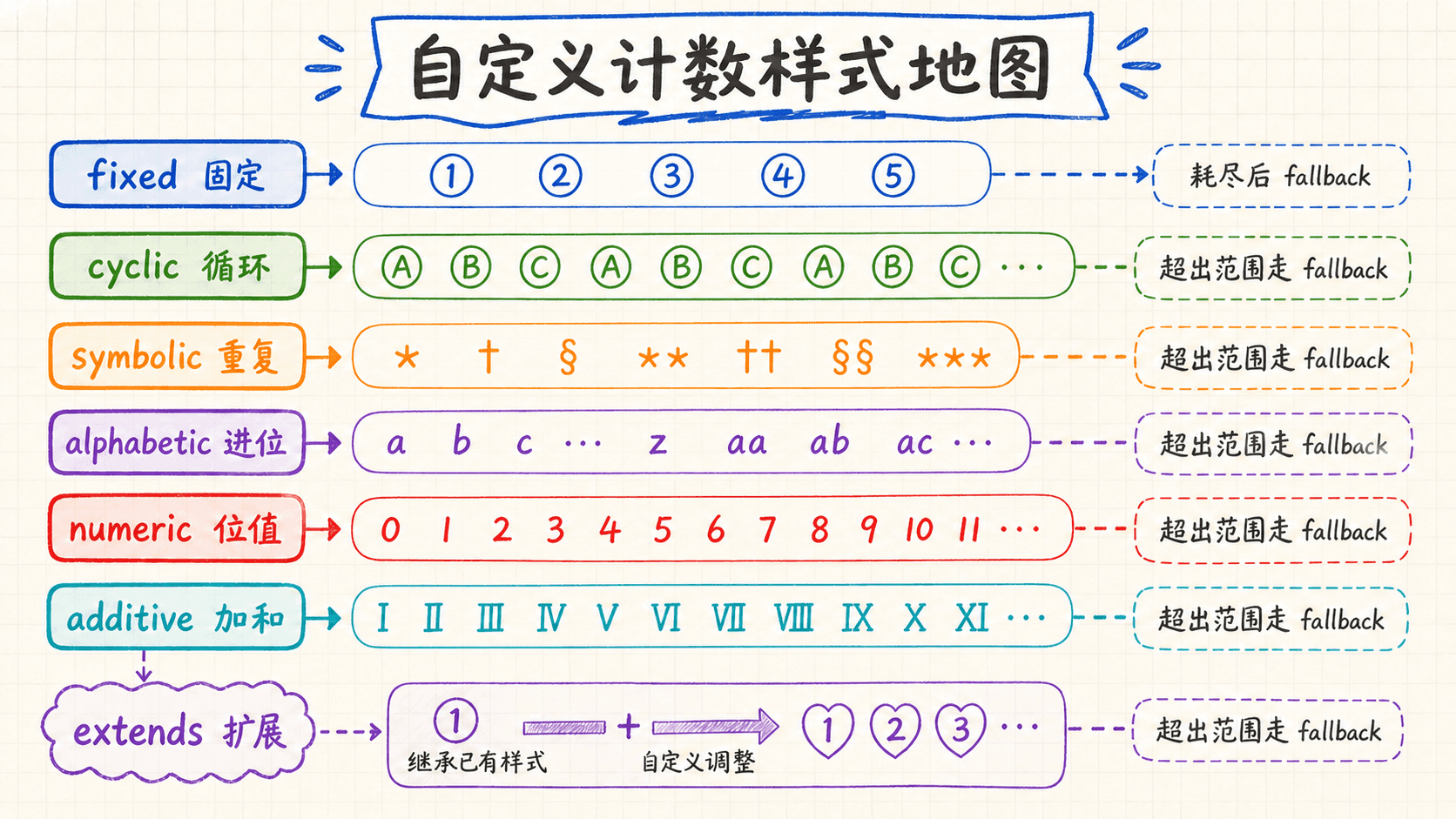
虽然CSS提供了许多内置的计数样式,但在某些特殊的设计需求中,我们需要创建完全自定义的计数模式。这时,@counter-style规则就成为了我们的强大工具。它允许我们定义全新的计数系统,从简单的符号序列到复杂的数学计数系统。

固定模式

固定计数模式(fixed system)是一种高度可控、精细化的自定义计数器方式。在这种模式下,你可以为计数器显式指定一组“符号”或“标记”,浏览器会按照你的顺序逐个使用这些符号来标记列表项。一旦符号用尽,计数器将不会自动生成新的标记,而是停止编号。这意味着无论列表多长,只会按照你定义好的有限符号依次标记,超出的项目将不会显示额外的编号。

这种机制特别适用于需要严格、唯一标识的列表场景,例如奖章、勋章、序列涂鸦、阶段性标签、特殊类型的选拔结果等。通过fixed系统,你可以完全掌控展示的符号,无需担心浏览器默认编号或符号“循环”带来的混乱,确保视觉和语义的严谨统一。

html
<!DOCTYPE html>
<html>
  <head>
    <style>
      @counter-style emoji-counter {
        system: fixed;
        symbols: 😀 😊 😄 😉 😍 🥰;
        suffix: " ";
      }
      
      .emoji-list {
        font-family: 'Arial', sans-serif;
        padding: 20px;
        background-color: #f0f8ff;
        border-radius: 10px;
      }
      
      .emoji-list ol {
        list-style: emoji-counter;
        padding-left: 40px;
      }
      
      .emoji-list li {
        margin-bottom: 15px;
        padding: 10px 15px;
        background-color: white;
        border-radius: 8px;
        box-shadow: 0 2px 4px rgba(0,0,0,0.1);
      }
    </style>
  </head>
  <body>
    <div class="emoji-list">
      <h3>心情表达列表</h3>
      <ol>
        <li>今天的心情非常愉快</li>
        <li>学习新知识让我感到满足</li>
        <li>和朋友聊天总是那么开心</li>
        <li>完成任务后的成就感</li>
        <li>对未来的期待和希望</li>
        <li>爱与被爱的幸福感觉</li>
        <li>超出范围的内容(无标记)</li>
      </ol>
    </div>
  </body>
</html>

这个例子展示了固定计数模式的特点:我们定义了六个表情符号作为计数器,当列表项超过六个时,后面的项目就不会显示标记。这种模式非常适合需要精确控制标记数量的场景。

循环模式

循环计数(cyclic)模式与固定模式最大的区别在于:当列表项数量超过预设的符号数时,计数器不会停止或省略标记,而是会自动回到第一个符号,进行循环重复。比如自定义了8个图标,用于一个包含20项的列表时,第9项会重新显示第1个符号,第10项显示第2个,以此类推,不断轮回。这样,无论列表有多少项,都可以保证每一项都有对应的视觉标记,不会出现标记丢失的情况。

对于需要处理未知长度或动态增长内容的场景,循环模式尤其适用。它既提升了符号使用的灵活性,也让视觉层次更加丰富有趣,非常适合如流程、阶段、周期性事件等结构化列表。此外,cyclic系统在底层实现上能确保符号连续分配、无缝衔接,极大地增强了网页的表达力和可维护性。

通俗来讲,循环模式就像钟表的指针,划到12点以后又回到1点,一圈下来从头再来,永远不会“罢工”。

html
<!DOCTYPE html>
<html>
  <head>
    <style>
      @counter-style phase-counter {
        system: cyclic;
        symbols: 🌑 🌒 🌓 🌔 🌕 🌖 🌗 🌘;
        suffix: " ";
      }
      
      .moon-phases {
        font-family: 'Georgia', serif;
        max-width: 600px;
        margin: 0 auto;
        padding: 30px;
        background: linear-gradient(135deg, #667eea 0%, #764ba2 100%);
        border-radius: 15px;
        color: white;
      }
      
      .moon-phases h3 {
        text-align: center;
        margin-bottom: 30px;
        font-size: 1.8em;
      }
      
      .moon-phases ol {
        list-style: phase-counter;
        padding-left: 40px;
        background-color: rgba(255,255,255,0.1);
        padding: 20px;
        border-radius: 10px;
      }
      
      .moon-phases li {
        margin-bottom: 15px;
        padding: 8px 12px;
        background-color: rgba(255,255,255,0.05);
        border-radius: 5px;
        line-height: 1.6;
      }
    </style>
  </head>
  <body>
    <div class="moon-phases">
      <h3>月相周期观察记录</h3>
      <ol>
        <li>新月:天空中的隐形客人</li>
        <li>蛾眉月:第一缕银光出现</li>
        <li>上弦月:半轮明月的优雅</li>
        <li>盈凸月:渐满的期待</li>
        <li>满月:完美的圆月之夜</li>
        <li>亏凸月:开始缓缓缺损</li>
        <li>下弦月:又一次半轮之美</li>
        <li>残月:最后的月光告别</li>
        <li>新月:循环重新开始</li>
        <li>蛾眉月:熟悉的开始</li>
      </ol>
    </div>
  </body>
</html>

通过月相符号的循环,我们可以看到计数器是如何在用完所有符号后重新开始的。这种循环模式非常适合表示周期性或重复性的内容。

字母模式

字母计数模式是一种专业的有序列表编号方式,常见于电子表格的列标。例如 Excel 表格的列序号,先是字母“A”到“Z”,接下来以“AA”、“AB”、“AC”……的形式递增。本质上,每个字母位置充当一位,超过 26 个字母时自动进位。这种编号方式直观易懂,便于大量项目的区分和查找,非常适合需要用字母作分级排序、索引或标识的场合,如表格、序号列表、章节索引等。在 CSS 中,可以通过 @counter-style 指令自定义这种计数机制,从而让 HTML 列表展示类似 Excel 列标的效果。

html
<!DOCTYPE html>
<html>
  <head>
    <style>
      @counter-style excel-columns {
        system: alphabetic;
        symbols: A B C D E F G H I J K L M N O P Q R S T U V W X Y Z;
        suffix: ": ";
      }
      
      .spreadsheet-demo {
        font-family: 'Consolas', monospace;
        background-color: #f8f9fa;
        padding: 30px;
        border-radius: 10px;
        max-width: 700px;
        margin: 0 auto;
      }
      
      .spreadsheet-demo h3 {
        color: #2c3e50;
        text-align: center;
        margin-bottom: 25px;
      }
      
      .spreadsheet-demo ol {
        list-style: excel-columns;
        background-color: white;
        padding: 20px;
        border-radius: 8px;
        border: 2px solid #3498db;
        columns: 3;
        column-gap: 20px;
      }
      
      .spreadsheet-demo li {
        margin-bottom: 12px;
        padding: 8px 12px;
        background-color: #ecf0f1;
        border-radius: 4px;
        break-inside: avoid;
      }
      
      .spreadsheet-demo li:nth-child(odd) {
        background-color: #d5dbdb;
      }
    </style>
  </head>
  <body>
    <div class="spreadsheet-demo">
      <h3>电子表格列标系统</h3>
      <ol>
        <li>第一列数据</li>
        <li>第二列数据</li>
        <li>第三列数据</li>
        <li>第四列数据</li>
        <li>第五列数据</li>
        <li>第六列数据</li>
        <li>第七列数据</li>
        <li>第八列数据</li>
        <li>第九列数据</li>
        <li>第十列数据</li>
        <li>第十一列数据</li>
        <li>第十二列数据</li>
        <li>第十三列数据</li>
        <li>第十四列数据</li>
        <li>第十五列数据</li>
        <li>第十六列数据</li>
        <li>第十七列数据</li>
        <li>第十八列数据</li>
        <li>第十九列数据</li>
        <li>第二十列数据</li>
        <li>第二十一列数据</li>
        <li>第二十二列数据</li>
        <li>第二十三列数据</li>
        <li>第二十四列数据</li>
        <li>第二十五列数据</li>
        <li>第二十六列数据</li>
        <li>第二十七列数据(AA)</li>
        <li>第二十八列数据(AB)</li>
        <li>第二十九列数据(AC)</li>
      </ol>
    </div>
  </body>
</html>

这个例子完美展示了字母计数模式的工作原理。从A到Z,然后是AA、AB、AC等,符合电子表格列标的计数规律。

罗马数字的计数系统

加法计数模式是一种灵活而强大的自定义计数方式,允许我们为每个计数符号分配一个精确的数值,并通过特定的符号组合来表达任意大的数字。 最典型的应用范例就是罗马数字(Roman Numerals)系统。在这种模式下,开发者可以通过 @counter-style 的 additive-symbols 属性,声明一组带有对应权重(数值)的符号,例如 M=1000、D=500、C=100、L=50、X=10、V=5、I=1 等。计数器会根据目标数字,自动选择合理的符号组合(如“XL”代表40,“IX”代表9),以最简、规范的方式生成序号。 这要求符号按数值从大到小依次声明,并允许符号的组合、叠加甚至“减法”表达(如IV=4)。

html
<!DOCTYPE html>
<html>
  <head>
    <style>
      @counter-style roman-numerals {
        system: additive;
        additive-symbols:
          1000 M,
          900 CM,
          500 D,
          400 CD,
          100 C,
          90 XC,
          50 L,
          40 XL,
          10 X,
          9 IX,
          5 V,
          4 IV,
          1 I;
        suffix: ". ";
      }
      
      .roman-history {
        font-family: 'Times New Roman', serif;
        background: linear-gradient(135deg, #2c1810 0%, #8b4513 100%);
        color: #f4e4bc;
        padding: 40px;
        border-radius: 15px;
        max-width: 600px;
        margin: 0 auto;
        box-shadow: 0 8px 32px rgba(0,0,0,0.3);
      }
      
      .roman-history h3 {
        text-align: center;
        font-size: 2em;
        margin-bottom: 30px;
        text-shadow: 2px 2px 4px rgba(0,0,0,0.5);
      }
      
      .roman-history ol {
        list-style: roman-numerals;
        padding-left: 40px;
        background-color: rgba(139, 69, 19, 0.2);
        padding: 25px;
        border-radius: 10px;
        border: 2px solid #daa520;
      }
      
      .roman-history li {
        margin-bottom: 20px;
        padding: 15px;
        background-color: rgba(255, 255, 255, 0.1);
        border-radius: 8px;
        border-left: 3px solid #daa520;
        line-height: 1.6;
      }
    </style>
  </head>
  <body>
    <div class="roman-history">
      <h3>罗马帝国重要事件</h3>
      <ol>
        <li>罗马建城传说</li>
        <li>罗马王政时代</li>
        <li>罗马共和国建立</li>
        <li>布匿战争时期</li>
        <li>内战与独裁</li>
        <li>罗马帝国诞生</li>
        <li>五贤帝时代</li>
        <li>帝国分裂危机</li>
        <li>蛮族入侵</li>
        <li>西罗马帝国灭亡</li>
        <li>东罗马帝国延续</li>
      </ol>
    </div>
  </body>
</html>

小结

CSS的列表和生成内容功能为我们提供了丰富的设计可能性。从基本的列表样式控制,到复杂的计数器系统,再到灵活的内容生成机制,这些特性让我们能够创造出既专业又富有创意的网页设计。

通过合理运用这些技术,我们不仅能提升内容的视觉层次和可读性,还能在不修改HTML结构的情况下实现丰富的视觉效果。掌握这些技能,将让我们的网页设计工作更加游刃有余。


实战练习

练习1:列表样式基础

创建一个无序列表,要求:

  • 使用方块作为列表标记
  • 设置列表项的字体颜色为蓝色
  • 每个列表项的底部外边距为10px
html
<!DOCTYPE html>
<html>
<head>
  <style>
    .custom-list {
      list-style-type: square;
    }
    .custom-list li {
      color: blue;
      margin-bottom: 10px;
    }
  </style>
</head>
<body>
  <ul class="custom-list">
    <li>第一项</li>
    <li>第二项</li>
    <li>第三项</li>
  </ul>
</body>
</html>

练习2:图像列表标记

创建一个列表,使用自定义的SVG图像作为列表标记。

html
<!DOCTYPE html>
<html>
<head>
  <style>
    .image-list {
      list-style-image: url('data:image/svg+xml;base64,PHN2ZyB3aWR0aD0iMjAiIGhlaWdodD0iMjAiIHZpZXdCb3g9IjAgMCAyMCAyMCIgZmlsbD0ibm9uZSIgeG1sbnM9Imh0dHA6Ly93d3cudzMub3JnLzIwMDAvc3ZnIj4KPGNpcmNsZSBjeD0iMTAiIGN5PSIxMCIgcj0iOCIgZmlsbD0iIzMzNzNkZiIvPgo8L3N2Zz4K');
      padding-left: 30px;
    }
    .image-list li {
      margin-bottom: 8px;
    }
  </style>
</head>
<body>
  <ul class="image-list">
    <li>使用SVG图像标记</li>
    <li>蓝色圆点样式</li>
    <li>自定义列表外观</li>
  </ul>
</body>
</html>

练习3:标记位置控制

创建一个列表,比较内部标记和外部标记的区别。

html
<!DOCTYPE html>
<html>
<head>
  <style>
    .outside-list {
      list-style-position: outside;
      background-color: #f0f0f0;
      padding: 10px;
      margin-bottom: 20px;
    }
    .inside-list {
      list-style-position: inside;
      background-color: #e8f4f8;
      padding: 10px;
    }
  </style>
</head>
<body>
  <h4>外部标记</h4>
  <ul class="outside-list">
    <li>标记位于外部</li>
    <li>传统的列表样式</li>
  </ul>
 
  <h4>内部标记</h4>
  <ul class="inside-list">
    <li>标记嵌入内容中</li>
    <li>紧凑的布局效果</li>
  </ul>
</body>
</html>

练习4:伪元素样式控制

使用::marker伪元素为列表项设置不同的颜色。

html
<!DOCTYPE html>
<html>
<head>
  <style>
    .styled-markers li:nth-child(1)::marker {
      color: red;
    }
    .styled-markers li:nth-child(2)::marker {
      color: blue;
    }
    .styled-markers li:nth-child(3)::marker {
      color: green;
    }
  </style>
</head>
<body>
  <ul class="styled-markers">
    <li>红色标记</li>
    <li>蓝色标记</li>
    <li>绿色标记</li>
  </ul>
</body>
</html>

练习5:生成内容基础

使用::before伪元素为标题添加表情符号。

html
<!DOCTYPE html>
<html>
<head>
  <style>
    h2::before {
      content: "📖 ";
      color: #1976d2;
    }
  </style>
</head>
<body>
  <h2>这是一个标题</h2>
  <p>标题前会显示书籍图标。</p>
</body>
</html>

练习6:动态内容生成

使用attr()函数显示链接的data-size属性值。

html
<!DOCTYPE html>
<html>
<head>
  <style>
    a[data-size]::after {
      content: " (大小:" attr(data-size) ")";
      color: #666;
      font-size: 0.9em;
    }
  </style>
</head>
<body>
  <a href="#" data-size="2.3MB">下载文件</a>
</body>
</html>

练习7:计数器基础操作

创建一个带编号的章节结构,使用计数器实现自动编号。

html
<!DOCTYPE html>
<html>
<head>
  <style>
    h1 {
      counter-reset: chapter;
    }
    h1::before {
      content: "第" counter(chapter) "章 ";
    }
    h2 {
      counter-reset: section;
      counter-increment: chapter;
    }
    h2::before {
      content: counter(chapter) "." counter(section) " ";
    }
    h3 {
      counter-increment: section;
    }
    h3::before {
      content: counter(chapter) "." counter(section) " ";
    }
  </style>
</head>
<body>
  <h1>CSS基础</h1>
  <h2>选择器</h2>
  <h3>元素选择器</h3>
  <h3>类选择器</h3>
  <h2>属性</h2>
  <h3>颜色属性</h3>
</body>
</html>

练习8:自定义计数器样式

创建一个使用固定符号的计数器,只显示前三个符号。

html
<!DOCTYPE html>
<html>
<head>
  <style>
    @counter-style fixed-counter {
      system: fixed;
      symbols: ⭐ 🌙 ☀️;
      suffix: " ";
    }
    .fixed-list {
      list-style: fixed-counter;
    }
  </style>
</head>
<body>
  <ul class="fixed-list">
    <li>第一个项目</li>
    <li>第二个项目</li>
    <li>第三个项目</li>
    <li>第四个项目(无标记)</li>
  </ul>
</body>
</html>

练习9:循环计数器样式

创建一个循环显示表情符号的列表。

html
<!DOCTYPE html>
<html>
<head>
  <style>
    @counter-style cycle-counter {
      system: cyclic;
      symbols: 😀 😊 😄;
      suffix: " ";
    }
    .cycle-list {
      list-style: cycle-counter;
    }
  </style>
</head>
<body>
  <ul class="cycle-list">
    <li>项目1</li>
    <li>项目2</li>
    <li>项目3</li>
    <li>项目4(循环回第一个符号)</li>
    <li>项目5(循环回第二个符号)</li>
  </ul>
</body>
</html>

练习10:字母计数器样式

创建一个使用字母编号的列表。

html
<!DOCTYPE html>
<html>
<head>
  <style>
    @counter-style letter-counter {
      system: alphabetic;
      symbols: A B C D E F G H I J K L M N O P Q R S T U V W X Y Z;
      suffix: ") ";
    }
    .letter-list {
      list-style: letter-counter;
    }
  </style>
</head>
<body>
  <ol class="letter-list">
    <li>第一项</li>
    <li>第二项</li>
    <li>第三项</li>
    <li>第二十七项(AA)</li>
  </ol>
</body>
</html>
  • 实验室
  • 列表样式
    • 标记类型的选择
    • 使用图像作为列表标记(List Marker Images)
    • 控制列表标记的位置
    • 样式属性的整合
  • 标记控制
    • 标记样式的用法
  • 生成内容
    • 基础内容的插入
    • 动态内容的生成
    • 引用符号的自动管理
  • 计数器
    • 计数器的基础操作
    • 计数器的显示
    • 计数器的作用域
  • 自定义计数模式
    • 固定模式
    • 循环模式
    • 字母模式
    • 罗马数字的计数系统
  • 小结
  • 实战练习
    • 练习1:列表样式基础
    • 练习2:图像列表标记
    • 练习3:标记位置控制
    • 练习4:伪元素样式控制
    • 练习5:生成内容基础
    • 练习6:动态内容生成
    • 练习7:计数器基础操作
    • 练习8:自定义计数器样式
    • 练习9:循环计数器样式
    • 练习10:字母计数器样式

目录

  • 实验室
  • 列表样式
    • 标记类型的选择
    • 使用图像作为列表标记(List Marker Images)
    • 控制列表标记的位置
    • 样式属性的整合
  • 标记控制
    • 标记样式的用法
  • 生成内容
    • 基础内容的插入
    • 动态内容的生成
    • 引用符号的自动管理
  • 计数器
    • 计数器的基础操作
    • 计数器的显示
    • 计数器的作用域
  • 自定义计数模式
    • 固定模式
    • 循环模式
    • 字母模式
    • 罗马数字的计数系统
  • 小结
  • 实战练习
    • 练习1:列表样式基础
    • 练习2:图像列表标记
    • 练习3:标记位置控制
    • 练习4:伪元素样式控制
    • 练习5:生成内容基础
    • 练习6:动态内容生成
    • 练习7:计数器基础操作
    • 练习8:自定义计数器样式
    • 练习9:循环计数器样式
    • 练习10:字母计数器样式