Pinia 状态管理:让共享状态有名字、有边界、有去处
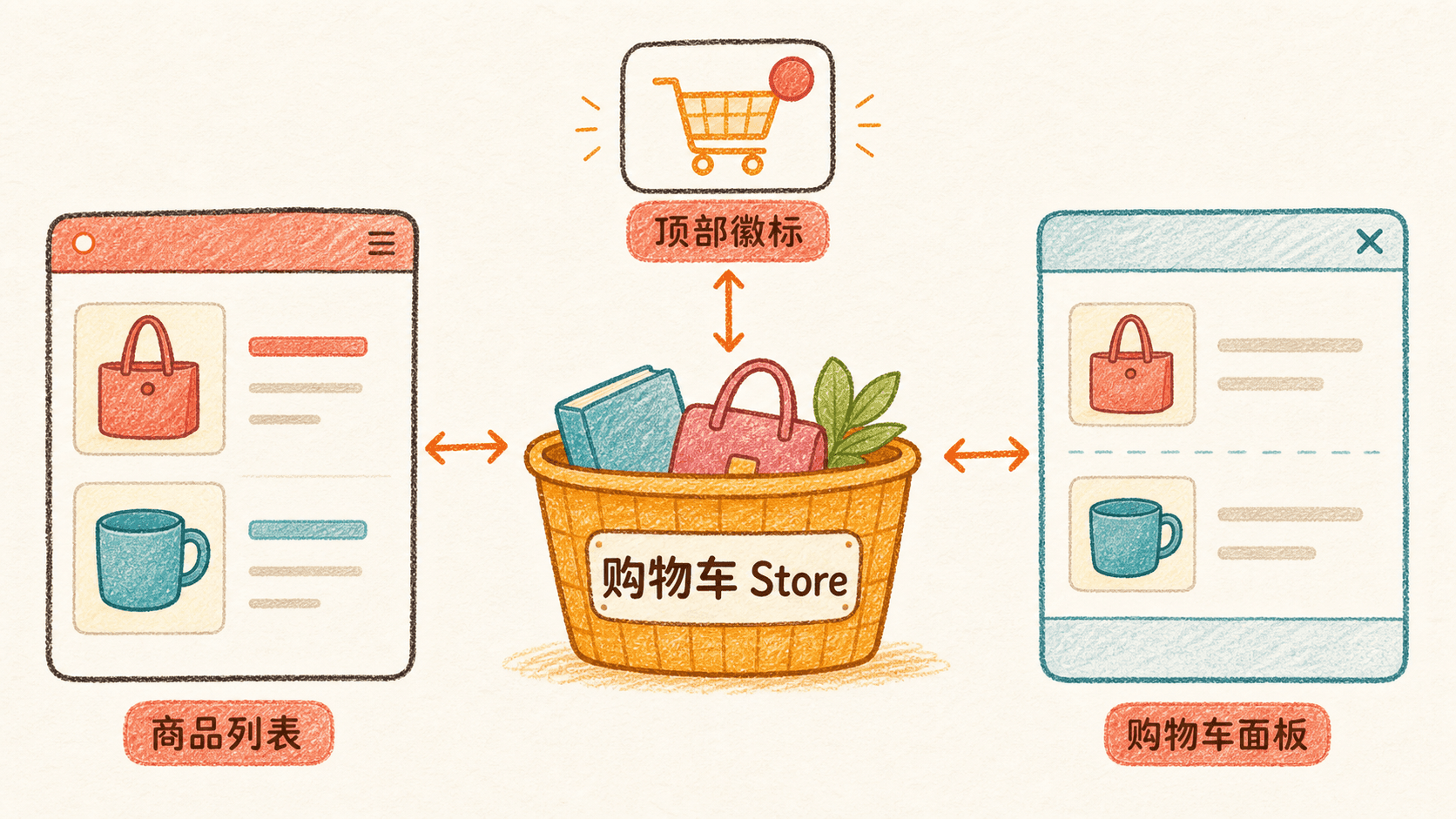
路由已经接通以后,手账商店的架构讨论很快落到一个具体问题上:用户在 /products 加了两件商品,再进入 /cart,看到的必须还是同一辆购物车。商品页和购物车页由不同路由承载,它们不是一对稳定的直接父子组件;页头的数量徽标、商品卡片和结算面板,又都要读取或改变这份数据。
如果让两个页面各自保存一份 items,路由一切换,两份数据就可能各说各话;如果把购物车一路提升到根组件,再穿过并不关心它的布局层层传递 props,每加一个入口都要重新接线。真正需要做的不是挑一条更长的传递路线,而是先回答:这份状态要活多久,它的业务所有权究竟在哪里?
把几种常见选择摆到一起,差别就清楚了:
这也补上了第 9 章与本章之间的边界。第 9 章关心的是一棵组件树内部的所有权与通信协议:父组件用 props 向下提供数据,子组件用事件向上表达意图,必要时用插槽或局部注入协作。本章面对的是另一种尺度:消费者可能分散在不同路由页面或相距很远的组件里,状态需要跨过组件的创建与销毁,在整个应用生命周期内保持同一份业务事实。
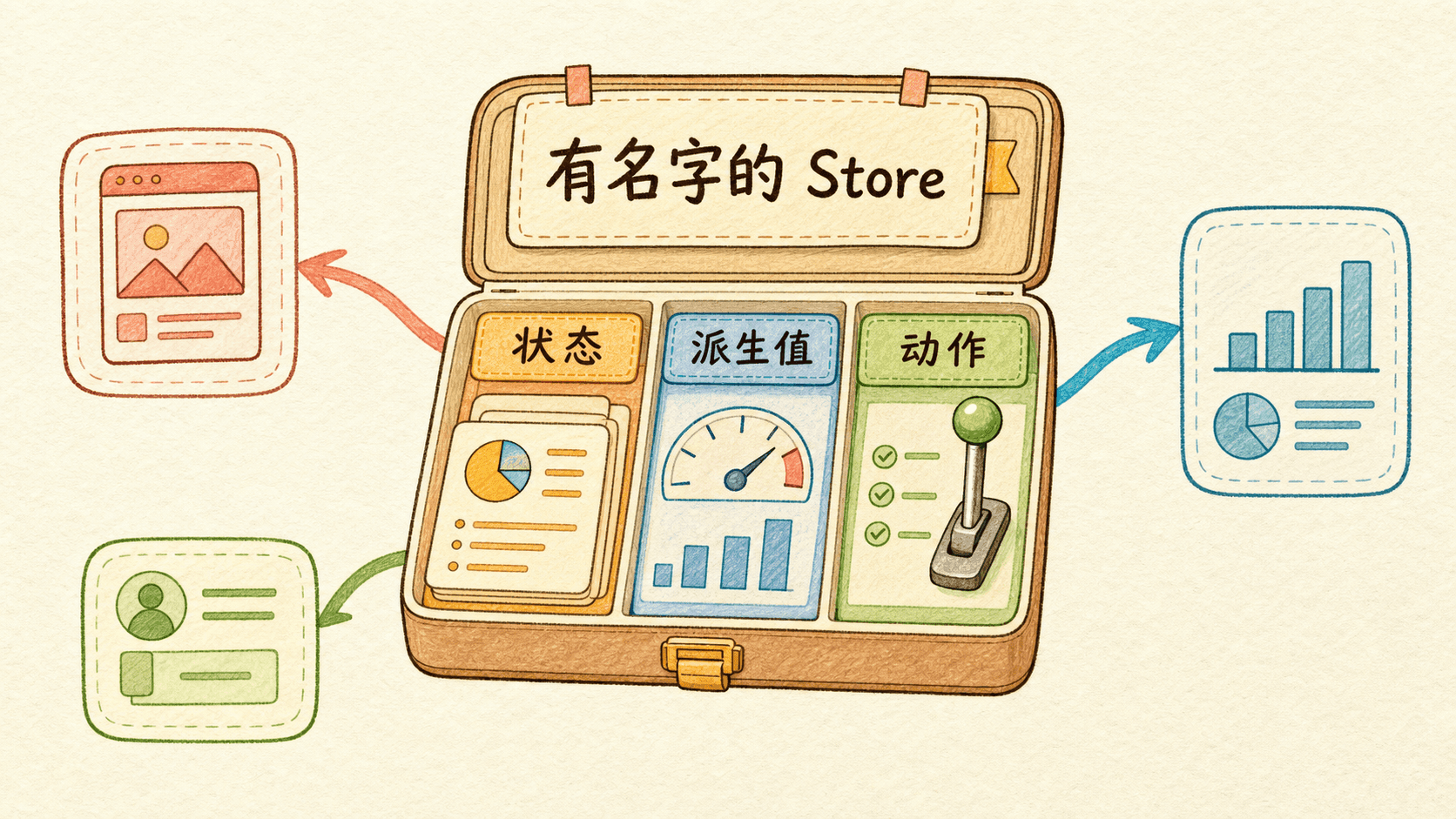
Pinia 的 Store 就是这个共同归属。你可以把它理解成一份有名字、可追踪、可复用的共享业务状态:它不依附某一个具体页面,真正需要它的组件都能取得当前应用中的同一个实例;每一次业务动作和状态变化,也能在开发工具里找到来路。它并不是用来取代第 9 章的组件通信,而是在状态的生命周期已经超出单棵组件树时,接过这份责任。
架构方案确定后,可以先把商品列表、顶部购物车摘要和购物车面板放在同一画面中,让三个位置共同读取、修改一份 cart Store,状态从动作到视图的流向会更容易观察。等这条数据链路理顺,再把商品列表放回 /products、购物车面板放回 /cart,甚至让顶部摘要留在跨页面布局中,变化的只是组件出现在哪里,购物车的业务归属并不会跟着移动。
Pinia 解决的是共享业务状态的组织问题,不是“把所有变量变成全局变量”的快捷方式。一个弹窗是否展开、某个输入框正在输入什么、鼠标是否悬停,通常仍应留在拥有它的组件中。

先判断:这份状态真的需要 Pinia 吗
刚学会 Store 时,人很容易获得一种“终于不用传 props 了”的轻松感,然后顺手把每一个 ref 都搬进 stores/。短期看,组件确实变薄了;过一阵再看,Store 里会同时出现登录用户、商品列表、弹窗开关、表单草稿、按钮加载状态和页面滚动位置。任何页面都能修改任何东西,反而更难判断一次变化从哪里来。
判断一份状态放在哪里,可以先问三个问题:
- 只有当前组件需要它吗?如果是,就使用组件内的
ref或reactive。 - 多个相距较远的组件或页面需要读写同一份数据吗?如果是,它很可能适合进入 Store。
- 它的核心其实是“从服务器获取、会失效、需要重新请求的数据”吗?这类数据可以在 Store 中协调,但仍要把请求、缓存时机和错误处理想清楚,不能因为放进 Store 就假装它永远新鲜。
以购物页面为例,可以这样划分:
这里还有一个很好用的判断:状态是否需要离开当前组件以后继续存在? 多步骤表单在页面切换后仍要保留草稿,适合 Store;一个组件销毁后就毫无意义的临时开关,通常不适合。
provide/inject 也不是错。它适合把一份依赖交给某个局部组件子树,例如表单上下文、主题配置或一组深层嵌套组件共同使用的控制器。Pinia 更适合应用级共享业务状态,因为它有明确的 Store 名称、统一的定义方式和更完整的调试支持。
“多个组件都能访问”不等于“所有组件都应该访问”。Store 仍然要按业务边界拆分,例如 useCartStore、useUserStore、usePreferenceStore。不要做一个包揽全站的 useGlobalStore。
在 Vite 项目中安装 Pinia
这里不重新搭一门课的起点,而是继续改造前面已经运行起来的 Vue 3 + Vite 应用。在现有项目根目录安装 Pinia:
bash
npm install pinia如果你只想把本章代码隔离出来验证,也可以把下面的 pinia-market 当作一个可选实验。它只是方便单独练习,不影响主线项目,也不意味着前面的组件与路由需要推倒重来:
bash
npm create vite@latest pinia-market -- --template vue
cd pinia-market
npm install
npm install pinia
npm run dev
安装依赖只是把 Pinia 放进项目。还要创建一个 Pinia 实例,并把它安装到当前 Vue 应用。修改 src/main.js:
js
import { createApp } from 'vue'
import { createPinia } from 'pinia'
import App from './App.vue'
import './style.css'

const app = createApp(App)
const pinia = createPinia()

app.use(pinia)
app.mount('#app')
顺序可以读成一句话:创建 Vue 应用,创建 Pinia,把 Pinia 交给应用,最后挂载。app.use(pinia) 不能漏掉。否则组件里虽然能导入 useCartStore,真正调用时却找不到当前应用对应的 Pinia 实例。
一个应用通常只创建一个根 Pinia 实例。不同业务并不是靠创建多个 Pinia 来隔离,而是靠多个有独立名称的 Store 来划分。
Store 的三块核心:状态、派生值与动作
Pinia 使用 defineStore() 定义 Store。它的第一个参数是应用内唯一的 id,第二个参数可以是配置对象,也可以是 setup 函数。我们先学更直观的选项式 Store:
js
import { defineStore } from 'pinia'

export const useCartStore = defineStore('cart', {
  state: () => ({
    items: [],
    checkoutStatus: 'idle',
    errorMessage: '',
  }),

  getters: {
这三块分别回答三个不同的问题:
state:现在保存了什么事实?例如购物车条目、结算状态和错误消息。getters:能从已有事实算出什么?例如商品总数和总价。actions:用户或系统想做什么?例如加入商品、减少数量、清空购物车和发起结算。
如果你熟悉组件的选项式 API,可以暂时把 state、getters、actions 对应理解成组件里的 data、computed、methods。不过 Store 的重点不在语法对应,而在它承载的是跨组件的业务状态和业务动作。
'cart' 不是展示给用户看的标题,而是 Store 身份。开发工具会用它识别 Store,应用中的 Store id 不能重复。导出的函数通常命名为 useCartStore:use 表明它像组合式函数一样调用,Cart 表明业务领域,Store 表明返回的是 Store。
state 只保存事实
state 必须是返回初始对象的函数:
js
state: () => ({
  items: [],
  checkoutStatus: 'idle',
  errorMessage: '',
})
需要响应式追踪的字段,应当一开始就在这里声明。即使用户信息尚未加载,也可以先写成 user: null;不要等请求完成后再临时给 Store 增加一个从未声明过的字段。
不要同时保存可以推导的重复事实。假如 items 已经包含每项的 quantity 和 price,再把 totalCount、totalPrice 放入 state,会出现两份真相。你必须在每次增减数量时同步修改三处,只要漏掉一处,页面就会互相打架。
getter 只负责推导
getter 很像基于 Store 状态建立的计算属性。相关 state 不变时,它会复用已有结果;依赖变化后,才重新计算。
js
getters: {
  totalCount: (state) =>
    state.items.reduce((sum, item) => sum + item.quantity, 0),

  totalPrice: (state) =>
    state.items
组件读取时不需要调用:
vue
<span>共 {{ cart.totalCount }} 件</span>
<strong>¥{{ cart.totalPrice.toFixed(2) }}</strong>
如果 getter 返回一个接收参数的函数,例如 productQuantity(id),使用时才需要传参:
js
getters: {
  productQuantity: (state) => (productId) => {
    return state.items.find((item) => item.id === productId)?.quantity ?? 0
  },
}
这种带参数的 getter 很方便,但它返回的是函数,不能像普通计算值那样简单缓存每一种参数结果。列表很大或计算很重时,要留意代价。
action 用业务语言描述改变
action 不只是“改一个变量的方法”。它适合表达完整业务意图:addProduct、removeProduct、checkout 都比 setItems 更容易追踪。以后在调试时间线里看到 checkout,你立即知道用户在做什么;看到连续五次 setValue,就很难还原上下文。
选项式 Store 的 action 通常通过 this 读取和修改当前 Store,因此不要把它写成箭头函数:
js
actions: {
  increase(productId) {
    const item = this.items.find((entry) => entry.id === productId)
    if (item) item.quantity += 1
  },
}
action 可以接收参数、返回结果、调用另一个 action,也可以是异步函数。Pinia 不要求另设一层 mutation,普通业务变化可以直接在 action 中完成。
完整案例:三个组件共享一辆购物车
我们要完成的页面有三个状态消费者:
ProductList.vue展示商品并加入购物车;CartSummary.vue在页头展示总件数和总价;CartPanel.vue修改数量、删除条目并发起结算。
它们不会互相保存购物车副本,也不需要组成一条很长的 props/emit 接力。三个组件调用同一个 useCartStore(),拿到的是当前应用中的同一份 cart Store。
项目的关键目录如下:
text
src/
├── components/
│   ├── CartPanel.vue
│   ├── CartSummary.vue
│   └── ProductList.vue
├── stores/
│   └── cart.js
├── App.vue
├── main.js
└── style.css
定义商品与购物车 Store
创建 src/stores/cart.js:
js
import { defineStore } from 'pinia'

const wait = (duration) =>
  new Promise((resolve) => window.setTimeout(resolve, duration))

export const useCartStore = defineStore('cart', {
  state
这里用 wait 模拟请求,所以代码可以直接运行。真正接接口时,把 await wait(900) 换成请求函数即可。Store 里的状态仍然遵循同一套节奏:请求前进入 loading,成功后写入结果,失败后写入错误。不要让每个调用 checkout() 的组件各自维护一套真假不一的加载状态。
商品列表保留自己的搜索词
创建 src/components/ProductList.vue:
vue
<script setup>
import { computed, ref } from 'vue'
import { useCartStore } from '../stores/cart'

const cart = useCartStore()
const keyword = ref('')

const products = [
  { id: 1, name
这里刻意把 keyword 留在组件中。它只影响商品列表,并不需要被页头和购物车面板读取。items 则来自 Store,因为另外两个组件需要同一份数据。这个区别就是状态边界。
顶部摘要用 storeToRefs 解构
创建 src/components/CartSummary.vue:
vue
<script setup>
import { storeToRefs } from 'pinia'
import { useCartStore } from '../stores/cart'

const cart = useCartStore()
const { totalCount, totalPrice } = storeToRefs(cart)
</script>

<template>
  <div class
模板会自动解包 ref,所以写 totalCount,不用写 totalCount.value。在 <script setup> 的 JavaScript 代码里读取或赋值 ref,仍要使用 .value。
购物车面板直接调用 action
创建 src/components/CartPanel.vue:
vue
<script setup>
import { storeToRefs } from 'pinia'
import { useCartStore } from '../stores/cart'

const cart = useCartStore()
const {
  items,
  totalCount,
  totalPrice,
  isEmpty,
  checkoutStatus,
  errorMessage,
  orderNumber,
}
state 和 getter 通过 storeToRefs(cart) 变成保持响应式的 refs;action 可以直接从 cart 解构,因为 action 已经绑定到 Store。按钮触发 increase(item.id) 后,Store 的 items 改变,列表数量、顶部总数和面板总价会一起更新。
在根组件中组装页面
修改 src/App.vue:
vue
<script setup>
import CartPanel from './components/CartPanel.vue'
import CartSummary from './components/CartSummary.vue'
import ProductList from './components/ProductList.vue'
</script>

<template>
  <div class="page-shell">
    <header class="site-header">
      <div>
        <p class
最后写入 src/style.css。这段样式不是 Pinia 的必要部分,但能让你更容易对照页面状态:
css
:root {
  font-family: Inter, "PingFang SC", "Microsoft YaHei", sans-serif;
  color: #26332e;
  background: #f4efe5;
  font-synthesis: none;
}

* {
  box-sizing: border-box;
}

body {
  margin: 0
页面会怎样变化
启动项目后,初始页面右上角显示“0 件,¥0.00”,购物车面板显示空状态。点击“森林便签套装”的加入按钮,三个位置会在同一次状态变化后同步更新:
text
商品卡片按钮:加入购物车 · 1
页头购物车摘要:1 件  ¥18.00
购物车面板:森林便签套装 × 1,合计 ¥18.00
再点击卡片一次,数量变成 2,总价变成 ¥36.00。从购物车面板点击减号,商品卡片上的数量也会回到 1。组件之间没有互相通知,因为它们观察的是同一个 Store。
点击“确认结算”后,按钮先显示“正在结算…”,并暂时禁用;完成后购物车清空,页面显示订单号。这里同步的已经不只是购物车条目,还包括一次业务流程的状态。
为什么直接解构会丢失响应式
Store 实例本身是响应式对象。下面这段看起来很自然,却埋着一个经典问题:
js
const cart = useCartStore()
const { items, totalCount } = cart
这里的解构拿走了“当前这一刻的值”,却没有保留它和响应式 Store 属性之间的联系。后面 cart.items 改变,局部变量 items 不会因此自动跟着变。它和直接解构 reactive 对象的属性是同一类问题。
正确做法有两种。最简单的是不解构,始终写 cart.items、cart.totalCount:
vue
<script setup>
import { useCartStore } from '../stores/cart'

const cart = useCartStore()
</script>

<template>
  <p>{{ cart.totalCount }} 件</p>
</template>
如果模板中频繁使用这些属性,希望名字短一些,就使用 storeToRefs():
js
import { storeToRefs } from 'pinia'

const cart = useCartStore()
const { items, totalCount, totalPrice } = storeToRefs(cart)
storeToRefs() 只把 state、getter 以及插件增加的响应式属性变成 ref,会跳过 action 和普通非响应式属性。action 可以直接解构:
js
const { addProduct, clearCart } = cart
只要你在组件里写出 const { someState } = store,就停下来检查:它是 state 或 getter,就改用 storeToRefs(store);它是 action,才可以直接解构。
选项式 Store 与 Setup Store 怎么选
defineStore() 的第二个参数还可以是 setup 函数。下面把一个偏好设置 Store 写成 Setup Store:
js
import { computed, ref } from 'vue'
import { defineStore } from 'pinia'

export const usePreferenceStore = defineStore('preference', () => {
  const theme = ref('paper')
  const fontSize = ref(16)

  const
在 Setup Store 中:
ref()与reactive()产生 state;computed()产生 getter;- 普通函数成为 action。
它与 <script setup> 的思维方式很接近,也方便在 Store 内使用 watch 或其他组合式函数。代价是你必须更清楚地维护边界。
最关键的约束是:Setup Store 的所有状态都必须返回。 不要试图用“创建一个 ref 但不 return”来做私有状态:
js
export const useBrokenStore = defineStore('broken', () => {
  const visibleCount = ref(0)
  const hiddenToken = ref('secret')

  return { visibleCount }
})
hiddenToken 没有被 Pinia 正确识别为 Store 状态,会破坏开发工具、插件和服务端渲染时对状态的理解。如果某个值真的不该成为共享状态,就让它留在模块服务、组合式函数或调用方中,不要把 Store 写成“表面公开、内部藏着另一套状态”的黑盒。
另一个差异是重置。选项式 Store 自动拥有 $reset();Setup Store 需要像上例一样自己编写 $reset(),逐项恢复初值。
我的建议很朴素:刚开始理解 Store,或者业务结构比较直接时,先用选项式 Store,state/getters/actions 的边界一眼就能看见;当你明确需要组合式函数、内部监听或更自由的组合方式时,再选择 Setup Store。两种写法都能和 <script setup> 组件配合,它们不是新旧关系。
修改、批量修改、重置与订阅
Pinia 允许直接修改 state:
js
cart.checkoutStatus = 'loading'这在小范围代码里没有问题。不过在真实业务中,我仍建议优先通过有意义的 action 修改。原因不是“直接修改不合法”,而是 action 能留下更清楚的业务入口,也能把校验和关联变化集中起来。
用 $patch 合并一组变化
一次动作要修改多个字段时,可以用对象形式的 $patch():
js
cart.$patch({
  checkoutStatus: 'idle',
  errorMessage: '',
  orderNumber: '',
})
处理数组追加、删除等操作时,函数形式更顺手:
js
cart.$patch((state) => {
  state.items.push({
    id: 5,
    name: '晚风贴纸包',
    price: 22,
    quantity: 1,
  })
  state.errorMessage = ''
}
函数里的多次修改会被归到一次 patch 记录中,查看调试时间线时更整齐。但 $patch() 也不是 action 的替代品:checkout() 描述业务行为,$patch() 描述一组状态修改,两者层次不同。
用 $reset 回到初始状态
选项式 Store 可以直接调用:
js
cart.$reset()它会重新执行 state(),用初始状态恢复当前 Store。我们的案例自己写了 clearCart(),是因为“清空购物车”是业务动作,它可以只清理与购物车相关的字段;$reset() 更像把整个 Store 恢复到刚创建时。
测试、退出登录或切换业务上下文时,$reset() 很实用。Setup Store 没有自动重置,需要自行实现。
用 $subscribe 观察状态变化
如果需要把偏好设置保存到浏览器,可以订阅 Store:
js
const preference = usePreferenceStore()

preference.$subscribe((mutation, state) => {
  localStorage.setItem(
    'note-preference',
    JSON.stringify({
      theme: state.theme,
      fontSize: state.
订阅适合“状态变化后统一做一件事”,例如持久化或记录必要的诊断信息。它不适合悄悄塞入核心业务流程。如果结算成功后必须创建订单,就应该把逻辑写在 checkout() 中,而不是依赖某个远处的订阅碰巧观察到状态变化。
持久化时也不要把整个 Store 无脑写入本地存储。访问令牌、隐私数据、短期错误信息和体积很大的列表都需要单独判断。浏览器存储也可能被清理,不能当成可靠数据库。
异步 action:把一次请求讲完整
action 可以直接写成 async,也可以 await 请求或另一个 action。最容易出问题的不是语法,而是请求生命周期没有被讲完整:只写了成功结果,忘了加载、失败和收尾。
一个容易调试的异步 action 通常包含这几个状态:
js
async checkout() {
  if (this.isEmpty || this.checkoutStatus === 'loading') return

  this.checkoutStatus = 'loading'
  this.errorMessage = ''

  try {
    const order = await orderApi.create({ items:
这里有几个值得养成的习惯:
- 请求前立即进入
loading,按钮据此禁用,避免重复提交。 - 新请求开始时清掉旧错误,避免页面一边加载一边显示上次失败。
try中只处理成功路径,catch中把可展示的错误写回状态。- 是否继续
throw error取决于调用方需不需要额外处理;一旦决定抛出,组件也要捕获。 - 成功后再清空购物车,不要在请求发出前就丢掉用户数据。
如果无论成功失败都要结束加载,可以把布尔值 isLoading 的恢复放进 finally。案例使用状态字符串,是因为 idle/loading/success/error 比两个互相组合的布尔值更不容易产生矛盾。

不要在 action 内吞掉所有异常,又让组件以为请求成功;也不要既在 Store 弹提示,又在组件弹一次同样的提示。Store 负责业务状态,界面如何呈现错误可以由组件决定,双方先约定清楚返回值和抛错方式。
用开发工具追踪“谁改了状态”
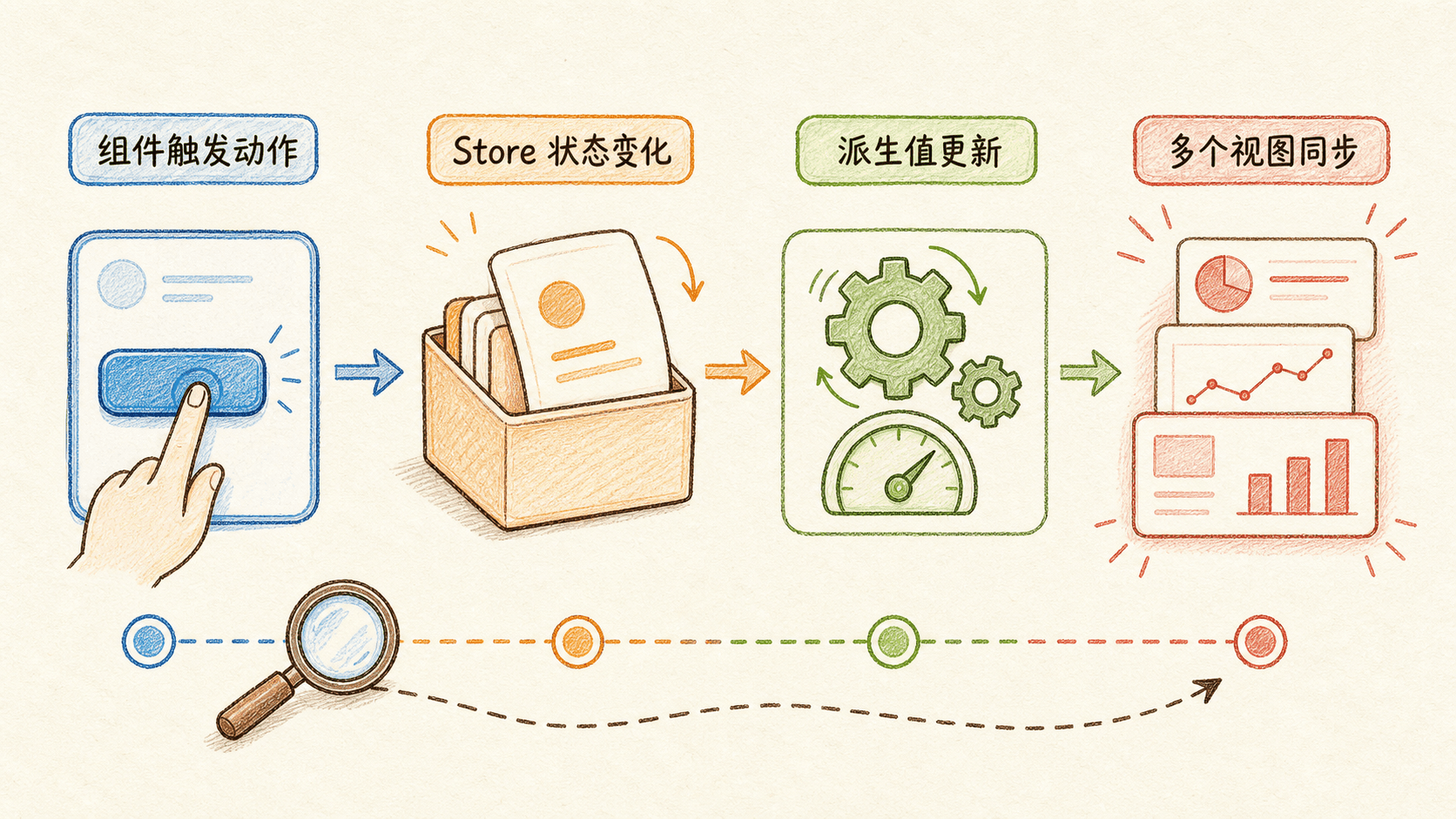
状态管理真正让人省心的地方,不只是少传几层 props,而是变化变得可解释。打开 Vue 开发工具后,可以找到 Pinia 面板,查看 cart Store 的当前 state、getters,以及 action 和 patch 的时间线。
调试购物车时,可以按这个顺序检查:
先看组件事件有没有触发。如果点击按钮毫无记录,问题多半在模板绑定、遮挡、禁用条件或函数调用处。
再看 action 是否出现,以及参数是否正确。addProduct 收到完整商品,还是只收到一个错误的 id,在这里很容易发现。
接着观察 items 是否按预期变化。action 发生但 state 没变,就回到 Store 检查查找条件、提前 return 和异常分支。
state 已变而页面没变时,检查组件是不是直接解构了 Store,或模板读的是另一份局部副本。
你也可以临时加一条订阅辅助观察:
js
cart.$subscribe((mutation, state) => {
  console.log('变化类型:', mutation.type)
  console.log('Store:', mutation.storeId)
  console.log('当前条目:', state.items)
}
问题定位后就删掉无用日志,不要让包含用户数据的完整状态长期出现在生产控制台。
插件、组件外使用与 SSR 的边界
基础项目掌握 Store 本身就够了。下面三点不要求你马上背住,但它们能解释一些“本地开发正常,换环境就出问题”的情况。
插件扩展的是所有或一组 Store
Pinia 插件通过 pinia.use() 注册,可以给 Store 增加属性或方法、拦截 action,或实现统一持久化。插件要在相应 Store 创建前注册:
js
import { createPinia } from 'pinia'

function createdAtPlugin() {
  return {
    createdAt: new Date().toISOString(),
  }
}

const pinia = createPinia()
pinia.use(createdAtPlugin)
插件适合真正横跨多个 Store 的能力。只有购物车需要的 checkout() 不该写成全局插件。持久化也不要一上来自己写一个“保存所有 Store”的大插件,先明确哪些字段允许保存、何时恢复、版本变化时如何迁移。
在组件外调用要等 Pinia 可用
在 <script setup> 顶层调用 useCartStore() 通常没有问题,因为组件执行时 Pinia 已安装。若在路由文件的模块顶层过早调用,可能发生 Pinia 还没创建就先取 Store 的情况。
更稳妥的做法,是把调用放在确定会晚于安装执行的函数中:
js
router.beforeEach((to) => {
  const user = useUserStore()

  if (to.meta.requiresAuth && !user.isLoggedIn) {
    return '/login'
  }
})
初始化顺序复杂时,也可以显式把创建好的 pinia 传给 useUserStore(pinia)。
SSR 必须避免跨请求共享状态
服务端渲染时,服务器会同时处理不同用户的请求。如果把一个全局单例状态永久放在模块顶层,不同请求可能意外读到彼此的数据。正确的方向是每个请求创建与当前应用对应的 Pinia 实例,并在必要时显式把这个实例交给 useStore()。
服务端状态送到客户端继续使用时,还要安全地序列化和恢复。普通 Vite 单页应用暂时不需要自己实现这些步骤;一旦项目进入 SSR 或使用相应框架,就应遵循该框架的集成方式,不能把浏览器端单例经验原样搬到服务器。
常见问题:从现象倒推原因
页面上的值一直不更新
先找有没有直接解构:
js
const { totalCount } = cart改成:
js
const { totalCount } = storeToRefs(cart)或者模板直接读取 cart.totalCount。
报错提示没有激活的 Pinia
检查 main.js 是否执行了 app.use(pinia);再检查是否在 Pinia 安装之前,就在普通模块顶层调用了 useStore()。
action 里的 this 是 undefined
选项式 Store 的 action 写成了箭头函数:
js
actions: {
  addProduct: (product) => {
    this.items.push(product)
  },
}
改成普通方法:
js
actions: {
  addProduct(product) {
    this.items.push(product)
  },
}
总价偶尔和条目对不上
检查是否把 totalPrice 同时存进了 state。能由 items 推导的值应该写成 getter,只保留一份事实。
调用 $reset 后没有恢复
先看 Store 是哪种写法。选项式 Store 自带 $reset();Setup Store 必须自己实现同名 action。
刷新页面后购物车消失
Pinia 管理的是运行期间的内存状态,并不会自动持久化。是否保存到浏览器或服务器是另一个产品决策。练习项目可以订阅后写入本地存储,真实项目还要考虑登录用户、数据安全、字段版本和服务端库存变化。
Store 越写越大
回到业务边界重新拆分。购物车、用户会话、界面偏好通常不是一件事。局部交互移回组件,可复用但不必全局共享的逻辑移到组合式函数,真正共享且需要追踪的业务状态留在 Store。
练习:亲手改变这份共享状态
练习一:增加购物车上限
要求每种商品最多加入 5 件。超过后不再增加,并把 errorMessage 设置为“每种商品最多购买 5 件”。应该修改组件还是 Store?
练习二:实现优惠后的价格
新增 getter discountedPrice:总价满 100 元时打九折,否则保持原价。不要把优惠后价格放进 state。
练习三:把偏好设置改成选项式 Store
把前面的 usePreferenceStore 改写为选项式 Store,并验证它能直接使用自动提供的 $reset()。
1
一个只有当前商品卡片需要的悬停状态,通常应该放在哪里?
2
从 Store 中解构 state 和 getter,同时保持响应式,应该使用什么?
3
下面哪些内容适合写成购物车 Store 的 action?
4
Setup Store 可以故意不返回某个 ref,把它当作安全的私有状态。
应用能运行,还没有成为可部署文件
到这里,Pinia 可以收回一点神秘感了。它没有另造一套响应式世界,Store 里的 state 仍由 Vue 的响应式系统追踪;它做的是给共享业务状态一个清楚的组织单位,再把 getter、action、调试时间线和扩展能力放在这个单位周围。
以后决定是否创建 Store 时,先别问“能不能放”,而问“谁需要它、它要活多久、谁可以修改它”。确实跨组件共享的业务事实,放进有明确名字的 Store;能从事实推导的结果,写成 getter;会改变业务状态的意图,收进 action;只服务当前组件的临时状态,就安心留在组件里。
最后记住两个最容易救命的细节:state/getter 要解构时使用 storeToRefs();Setup Store 中的状态必须全部返回。它们看起来只是语法小点,却直接决定页面是不是仍然响应、调试工具是不是还能看懂你的 Store。
回头看这几章,应用的运行时关系已经逐渐理顺:组件负责组织界面和局部交互,Router 让 URL 对应到不同的界面树,Pinia 则让购物车这类业务状态跨过路由切换,继续保持同一份事实。现在从 /products 进入 /cart,页面能找到,状态也不会因为视图更换而失去归属。
不过,此刻能运行的仍是项目源码,还不是可以直接交给服务器的部署文件。浏览器本身不认识 .vue,源码中的 npm 包导入需要解析,样式与图片的资源路径需要重新处理,生产环境直接刷新 /cart 时也需要服务器把请求正确交还给前端路由。执行 npm run build 后,Vite 为什么能把这一整套源码整理成 dist,其中的 HTML、JavaScript 和静态资源又该怎样部署与验收?从源码到 dist 的 Vite 构建链路,必须把这些发布问题一一解释清楚。