样式和 CSS:让界面规则经得住路由切换
前几章里,我们已经把团队知识库的路由、布局、数据和导航接了起来。现在页面能打开,项目列表也能从 /workspace/projects 进入详情页,但只要开始认真做界面,新的问题就会一起冒出来:为什么某个页面的全局样式会影响另一个页面?为什么一段 Tailwind 类在开发环境正常,构建后却像没有生成?为什么深色主题刷新时会先白一下?为什么同一张项目卡放进侧栏后挤得难看,放进主内容区又显得太空?
这些问题表面上都叫“CSS 问题”,根源却不一样。有的是作用域没有划清,有的是构建工具没有看见类名,有的是层叠顺序依赖了偶然的导入路径,还有的是浏览器第一次绘制时根本不知道应该使用哪套主题。
这一章继续使用“项目协作台”作为贯穿案例。我们会完成一张 ProjectCard:它能出现在窄侧栏和宽主区域,支持浅色与深色主题,能显示活跃、暂停和归档状态,也会尊重用户的减少动态效果偏好。重点不是把卡片做得多花哨,而是借它建立一套能排错、能扩展的样式边界。
本章以当前课程仓库实际安装的 Next.js 16.1.6、React 19.2.3 和 Tailwind CSS 4.1.18 为基线。虽然 Next.js 16 默认使用 Turbopack,但本项目的开发和构建脚本都显式带有 --webpack。这个差异会影响少量 CSS Modules 组合行为和排错方式,因此正文会把“当前项目能用的写法”与“迁移到默认 Turbopack 时要注意的边界”分开说明。
先按职责分样式,不要先站队
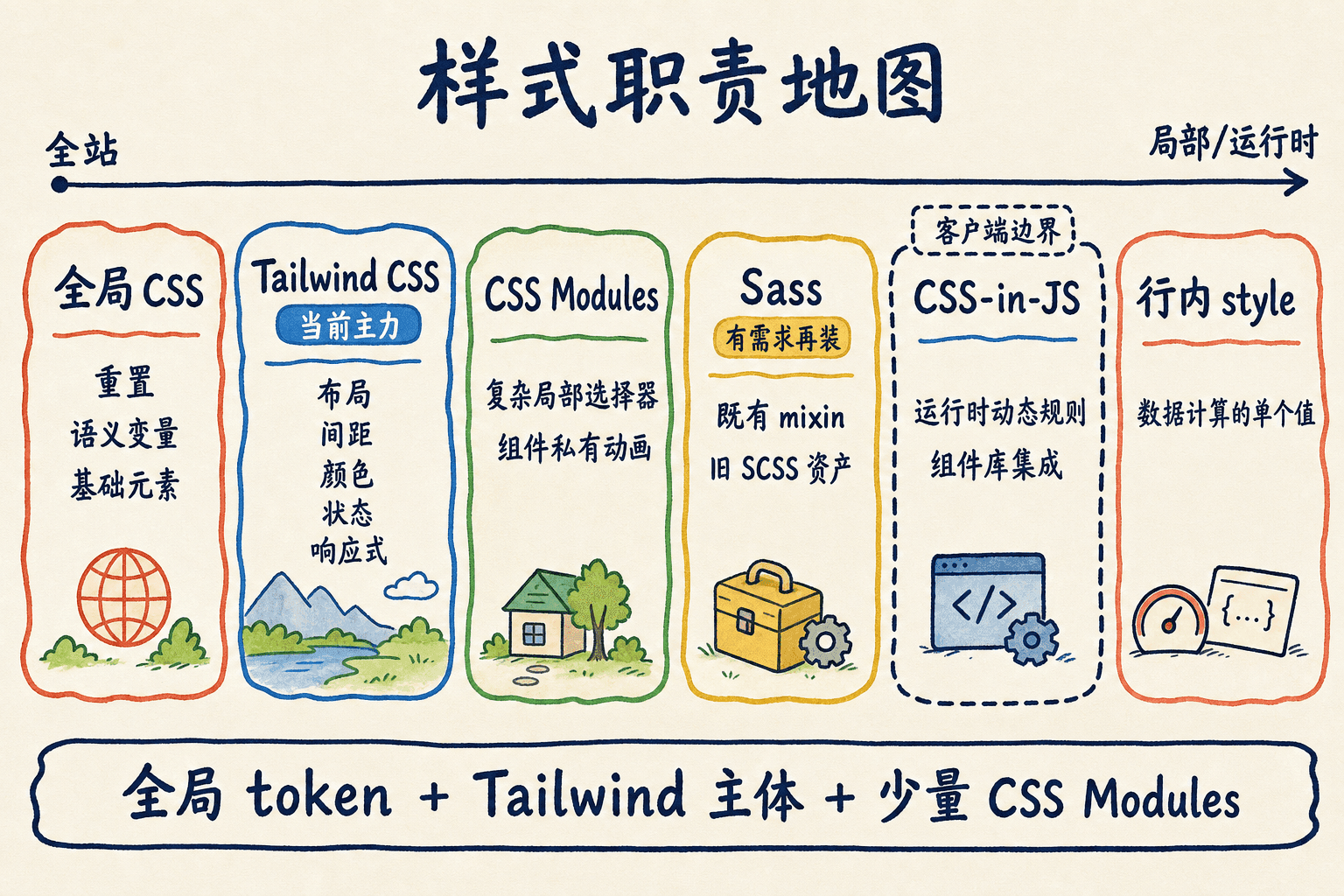
很多团队讨论样式时,会直接从“Tailwind 还是 CSS Modules”开始。这个问题问得太早了。更有用的顺序是先判断一条规则承担什么职责,再决定用哪种工具表达。
我们可以先问四个问题:
- 它应该影响多大范围? 是整个站点、一个路由子树,还是一个组件?
- 它是否需要在运行时生成? 颜色和尺寸能否在构建时确定,还是必须根据浏览器里的数据动态计算?
- 它是否需要形成团队约定? 比如背景色、正文色和间距应该成为共享 token,还是只服务一个局部装饰?
- 它最后怎样到达浏览器? 是构建时抽取出的静态 CSS,还是水合后由 JavaScript 注入的规则?
把这四个问题放到常见方案上,会得到一张更实用的地图:
当前仓库本身已经给出了一种可工作的混合方式:app/globals.css 负责 Tailwind 入口、语义变量、基础层和少量自定义 utility;组件的大部分外观直接使用 Tailwind 类。仓库还没有 .module.css 或 Sass 文件,所以我们会把 CSS Modules 当成“需要复杂局部规则时再加入”的工具,而不是为了展示技术而强行改造所有组件。
下面的实验台会根据“作用域、运行时动态性、既有技术债和客户端成本”给出方案建议。它不替你做架构决定,但能迫使我们把选择理由说清楚。
1
项目卡片的背景色需要随深浅主题变化,而且全站几十个组件都要复用这个语义。最合适的起点是什么?
全局 CSS 只处理真正全局的事情
在 App Router 中,全局 CSS 不再像 Pages Router 那样只能从 _app 导入。官方规则允许我们从 app 目录中的 layout、page 或 component 导入全局样式。这里最容易产生一个误解:允许从任何地方导入,不等于应该把全局规则散落在任何地方。
原因在客户端导航。当前 Next.js 会使用 React 的 stylesheet 支持与 Suspense 协作,但从某个路由导入的全局样式,在离开该路由后目前不会自动从文档中移除。如果 /workspace/reports 导入了这样一条规则:
css
.card {
  border: 0;
  background: white;
}
用户先访问报表页,再软导航到项目页,这条全局 .card 仍可能留在文档里。项目页恰好也用了 .card,结果就取决于选择器权重和最终顺序。直接刷新项目页时又可能没有问题,于是团队会看到“只有按某条路径进入才坏”的难查故障。
根布局是全局入口,不是全局垃圾桶
当前项目在根布局中集中导入三类全局样式:第三方 KaTeX 样式、Tailwind 与站点 token、MDX 表格样式。简化后结构如下:
tsx
// app/layout.tsx
import 'katex/dist/katex.min.css'
import './globals.css'
import './styles/mdx-table.css'
import type { ReactNode } from 'react'

export default function RootLayout({
  children,
}: Readonly<{ children: ReactNode }>) {
  return (
这类入口适合放:
- Tailwind 的单一入口;
:root和主题选择器中的语义变量;box-sizing、页面背景、正文颜色等基础规则;- 文章渲染器、公式排版这类确实跨路由共享的第三方样式;
- 明确属于全站的 cascade layer 顺序。
它不适合放“某一张卡片为了赶进度临时写的 .title”,也不适合用宽泛选择器修一个局部组件。例如 .workspace button { ... } 看似限定在工作台里,但随着布局复用,它可能同时覆盖弹窗、编辑器和第三方控件。
基础规则也要控制影响面
一个克制的全局入口可以这样组织:
css
/* app/globals.css */
@import 'tailwindcss';

@layer base {
  *,
  *::before,
  *::after {
    box-sizing: border-box;
  }

  html {
    color-scheme: light;
  }

  html.dark {
    color-scheme: dark;
这里没有使用 * { margin: 0; padding: 0 } 把所有元素的浏览器默认行为全部抹掉。列表、表单和标题的默认样式是否要重置,应该根据项目的排版系统逐项决定。全局选择器越宽,后面每个组件为恢复正常语义付出的覆盖成本就越高。
路由专属规则优先局部化
如果样式只属于 ProjectCard,优先选择以下任一方式:
- 把 Tailwind 类写在组件的 JSX 中;
- 建立
ProjectCard.module.css并由组件导入; - 把真正可复用的外观封装成共享组件,而不是让页面越过组件边界导入它的样式。
不要用“我只在一个页面导入,所以它就是页面级 CSS”来判断作用域。普通 CSS 里的选择器仍是全局的,而且样式表可能在客户端导航后继续存在。作用域来自生成后的选择器和组件边界,不来自导入语句所在的文件夹名称。
2
App Router 中从某个 page.tsx 导入的全局 CSS,会在离开该页面时自动从文档中移除,因此不会影响后续路由。
CSS Modules 是组件的样式契约
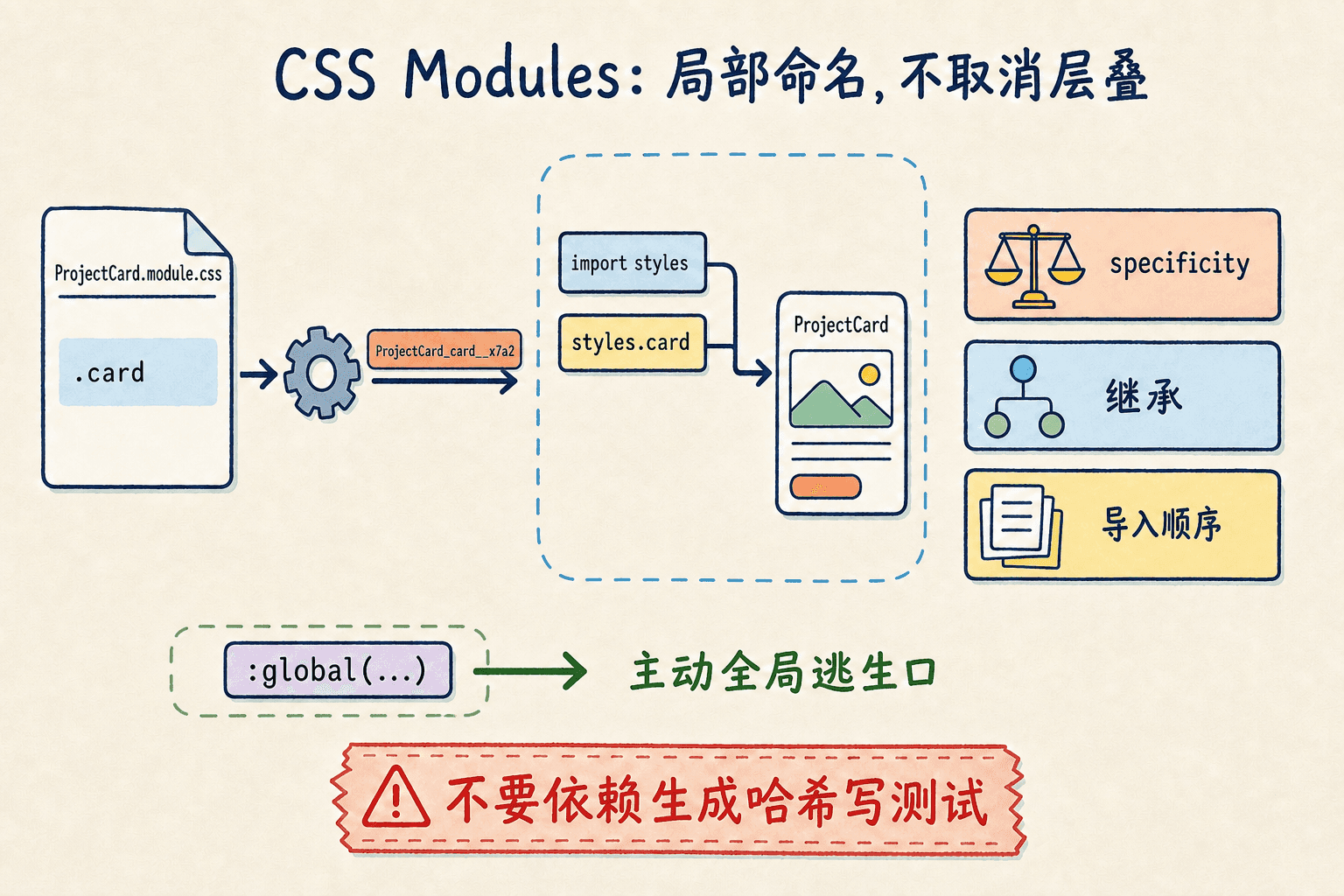
CSS Modules 的核心并不是“换一种文件后缀”,而是让一个 CSS 文件导出局部类名映射。只要文件名使用 .module.css,Next.js 就会把其中的类名处理成局部标识。两个组件都写 .title,构建结果也会得到不同的类名。
我们先为项目卡片建立一份局部样式:
css
/* components/projects/ProjectCard.module.css */
.card {
  container-type: inline-size;
  border: 1px solid var(--border-color-primary);
  border-radius: 1rem;
  background: var(--background-secondary);
  padding: 1rem;
}

.header {
  display
组件导入后拿到的是一个映射对象:
tsx
// components/projects/ProjectCard.tsx
import clsx from 'clsx'
import styles from './ProjectCard.module.css'

type ProjectCardProps = {
  name: string
  compact?: boolean
}

export function ProjectCard({ name, compact = false }: ProjectCardProps)
最终类名可能类似 ProjectCard_card__a1b2c,但这个字符串不是公共 API,不要在测试、脚本或另一个样式表里硬编码它。组件只通过 styles.card 使用映射。
命名只需要服务模块内部
局部作用域已经解决了大部分命名冲突,所以不必机械地把每个类写成 .project-card__header-title。card、header、title、statusDot 这类简洁名称更容易在 JSX 中阅读。
如果写成带连字符的 .status-dot,需要使用 styles['status-dot'];使用 camelCase 可以直接写 styles.statusDot。这不是语义对错,而是团队在 CSS 和 TypeScript 之间选择一致的访问方式。
组合类名比隐藏继承更直观
CSS Modules 支持 composes。同一个模块中可以这样组合:
css
.card {
  border-radius: 1rem;
  padding: 1rem;
}

.compactCard {
  composes: card;
  padding: 0.75rem;
}
导出的 styles.compactCard 会包含两个生成类名。跨文件组合也可以写成:
css
.primaryAction {
  composes: button from './ButtonBase.module.css';
  background: var(--accent);
}
但要注意打包器边界。当前仓库强制使用 webpack,底层 css-loader 支持这套组合语法。Next.js 16 默认 Turbopack 也支持 CSS Modules,但不支持从普通 .css 文件把类当作局部模块来 composes;跨文件源应保持 .module.css。为了让组件状态在不同打包器下都一眼可见,本章主示例仍然推荐 clsx(styles.card, compact && styles.compact)。
局部类不等于没有层叠
哈希只防止名字碰撞,不会取消 CSS 的 specificity、继承和顺序。模块里的 color 仍可能被更高权重的全局选择器覆盖,元素也仍会继承父级的字体和文本颜色。
同样,:global(...) 能从 Module 中主动写全局选择器:
css
.content :global(.third-party-badge) {
  border-radius: 999px;
}
它适合给无法修改类名的第三方结构加一个局部外壳,不适合绕过作用域,把整份 Module 又写成全局 CSS。
3
关于 CSS Modules,下列哪些说法正确?
Tailwind v4 的真实构建链
旧版教程常把 Tailwind 描述成三件套:创建 tailwind.config.js、填写 content 数组、在 CSS 中写三条 @tailwind 指令。那是 v3 的典型配置。当前仓库使用 Tailwind 4.1.18,主流程已经变成 CSS-first,但它并没有因此脱离构建工具。
当前项目需要哪些包
对于 Next.js 和 PostCSS,稳定安装命令是:
bash
npm install --save-dev tailwindcss @tailwindcss/postcss postcss不要再使用早期预览阶段的 tailwindcss@next。当前项目已经安装这些依赖,无需重复执行。它的 postcss.config.mjs 是:
js
// postcss.config.mjs
const config = {
  plugins: ['@tailwindcss/postcss'],
}

export default config
Next.js 官方示例也常把 plugins 写成对象,两种受支持格式表达的是同一件事:让 PostCSS 在构建 CSS 时调用 Tailwind v4 的专用插件。
全局入口再导入 Tailwind:
css
/* app/globals.css */
@import 'tailwindcss';
因此,“Tailwind v4 不再需要 postcss.config”是错误结论。更准确的说法是:v4 不再要求新项目先创建 JavaScript 主题配置,也不再需要单独安装 postcss-import 和 Autoprefixer;@tailwindcss/postcss 内部会处理 Tailwind 生成、CSS 导入、供应商前缀和现代语法转换。
CSS-first 不等于所有变量都写进 @theme
@theme 的职责是声明会影响 Tailwind utility API 的主题变量。例如:
css
@theme {
  --color-project-live: oklch(0.72 0.14 166);
  --font-sans: 'Noto Sans SC', system-ui, sans-serif;
  --breakpoint-3xl: 120rem;
}
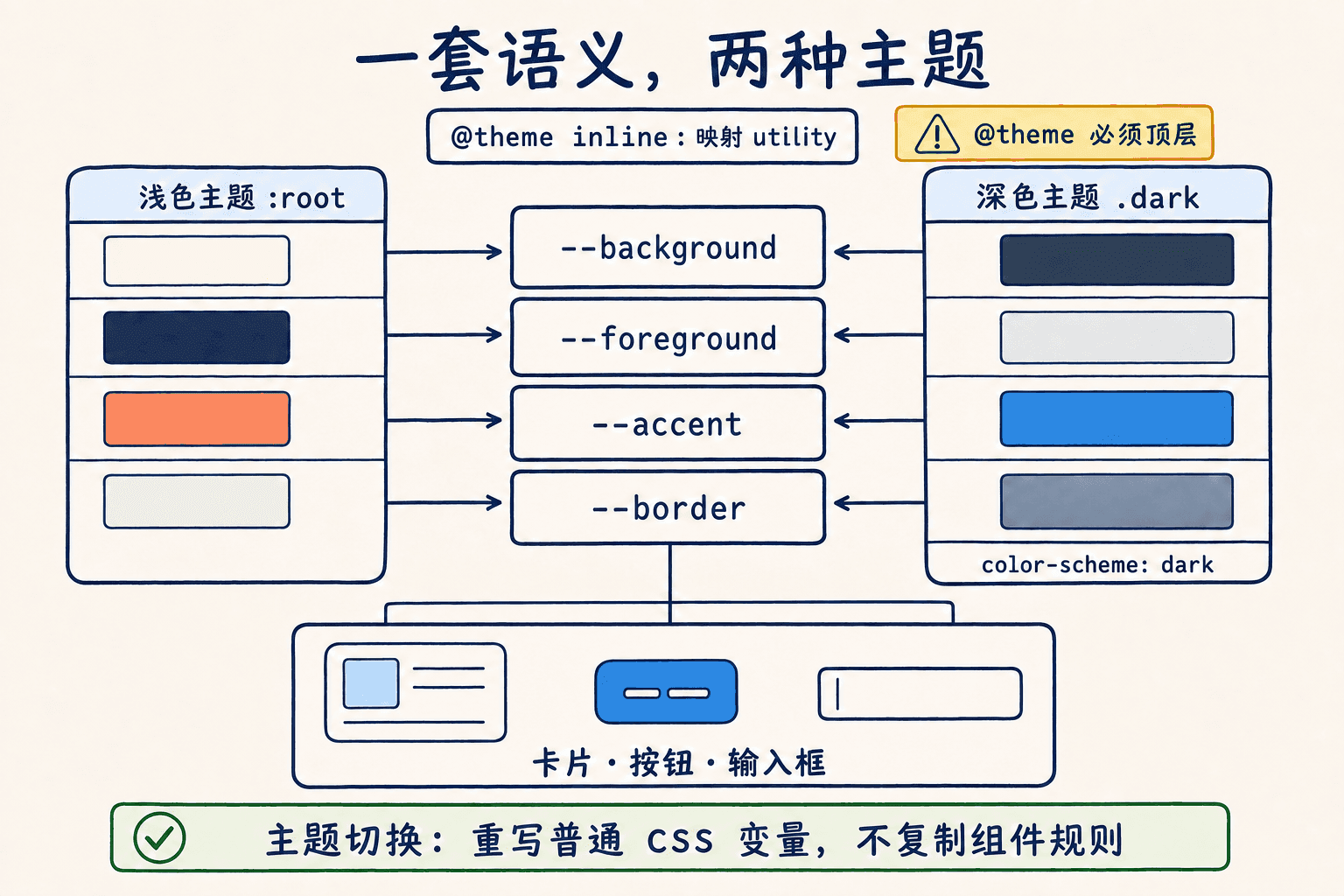
这些变量会生成或影响 bg-project-live、font-sans、3xl:* 等 utility。@theme 必须位于顶层,不能嵌进 .dark 或 @media。如果一个变量只是普通运行时值,不需要生成 utility,就继续放在 :root 中。
字体命名空间是 --font-*,因此旧稿中的 --font-family-sans 不会按预期生成 font-sans。
自动扫描只认识完整字符串
Tailwind v4 会自动寻找源文件中的候选类名,不需要为普通 Next.js 项目维护 content 数组。它把源码当作文本扫描,并不会执行 JavaScript,也不会理解模板字符串的业务含义。
下面的写法看起来合理,但扫描器看不到完整的 bg-blue-600 或 bg-red-600:
tsx
type Tone = 'blue' | 'red'

export function Badge({ tone }: { tone: Tone }) {
  return <span className={`bg-${tone}-600 text-white`}>{tone
应把业务值映射到完整类名:
tsx
import clsx from 'clsx'

const toneClasses = {
  blue: 'bg-blue-600 text-white hover:bg-blue-500',
  red: 'bg-red-600 text-white hover:bg-red-500',
} as const

type Tone = keyof typeof toneClasses

export function Badge({ tone }: { tone: Tone
这种映射还有一个好处:业务状态和视觉选择显式绑定,类型系统也能检查漏掉的状态。
默认扫描会忽略 .gitignore 中的路径、node_modules、二进制文件、CSS 文件和锁文件。如果 monorepo 中有一个被忽略的共享 UI 包,可以在 CSS 入口显式注册:
css
@import 'tailwindcss';
@source '../packages/shared-ui';
路径相对于当前样式表。不要为了“保险”扫描整个磁盘;源范围越模糊,构建成本和误命中越难解释。
插件、自定义 utility 和 Module 引用
当前仓库还加载了 Typography 插件:
css
@plugin '@tailwindcss/typography';自定义单一职责工具可以使用 @utility:
css
@utility scrollbar-hidden {
  &::-webkit-scrollbar {
    display: none;
  }
}
如果在 CSS Module 中使用 @apply,该模块是单独处理的,需要通过 @reference 获得全局主题和自定义 utility 的上下文:
css
/* ProjectCard.module.css */
@reference '../../app/globals.css';

.title {
  @apply text-base font-semibold text-primary;
}
不过,能写不代表应该大量写。把几十个 Module 都变成 @apply 容器,会增加独立处理次数,也把原本直接可见的 utility 藏进另一层。若只是引用 token,直接写 color: var(--primary) 通常更简单。
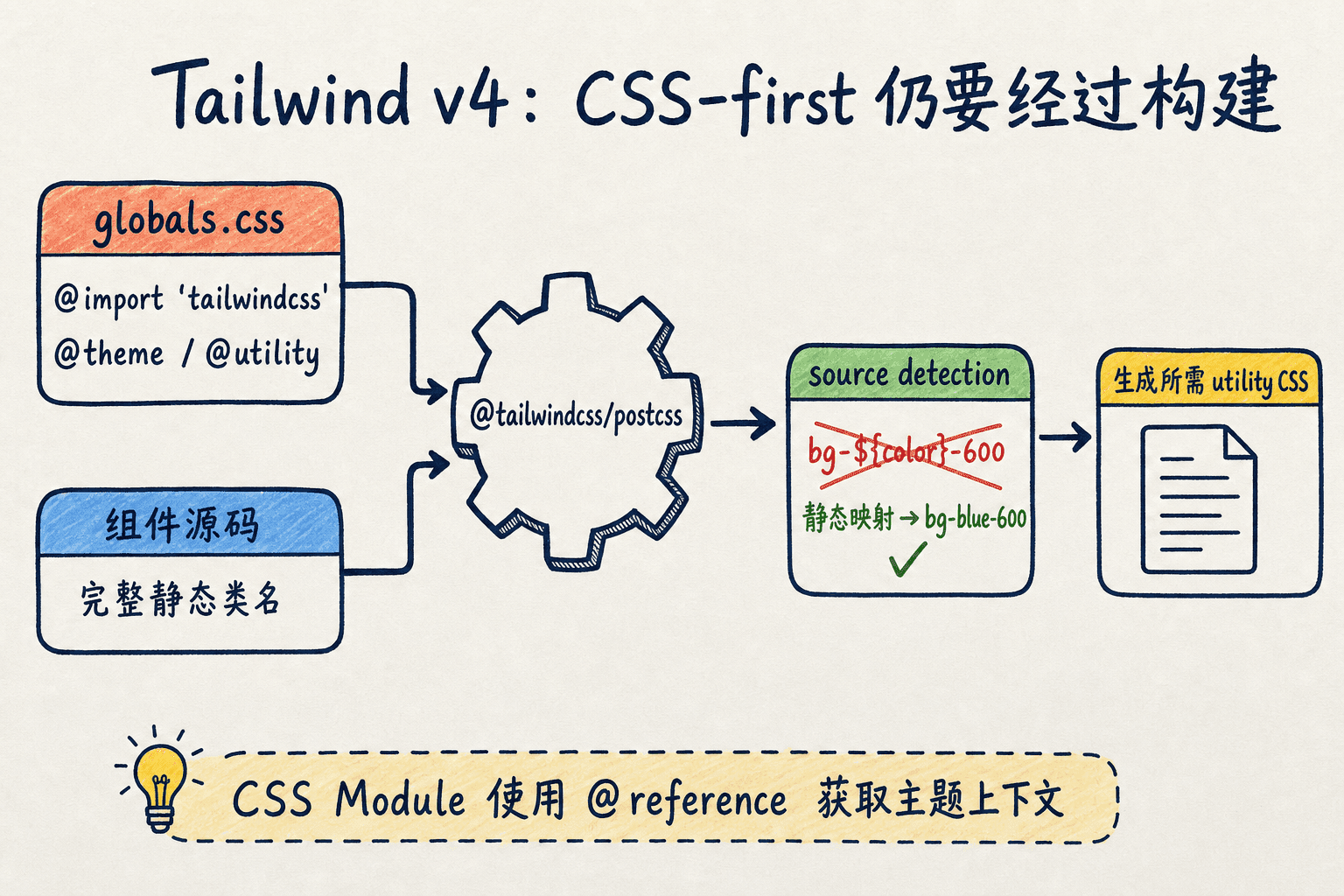
下面的实验台会对比完整静态类、动态拼接和静态映射,并展示 @theme token 怎样成为 utility。它是教学模型,不是浏览器内运行的 Tailwind 编译器。
当前仓库锁定 Tailwind 4.1.18。Tailwind 官网会持续展示更新版本能力,例如 4.3 新增的 @container-size。阅读最新文档时要先核对安装版本;本章只使用 4.1 已有的普通 @container、主题变量、状态 variant 和 source 检测能力。
4
组件接收 color='blue',下面哪种写法最能保证 Tailwind v4 生成所需样式?
用语义 token 连接浅色、深色和组件
如果组件直接依赖 gray-50、gray-900 这类具体色阶,换主题时很快会陷入逐个替换。语义 token 先描述用途,再为不同主题提供值:
--background-primary:页面主背景;--background-secondary:卡片或次级区域;--primary:主要文本;--secondary:次要文本;--border-color-primary:常规边界;--accent:当前强调色。
普通变量保存运行时主题值
下面是当前项目模式的精简版:
css
:root {
  --background-primary: oklch(97.5% 0 0);
  --background-secondary: oklch(95% 0 0);
  --primary: oklch(10% 0 0);
  --secondary: oklch(30% 0 0);
  --border-color-primary: oklch(
组件只依赖语义,不关心当前主题的具体色值。
@theme inline 把语义变量接入 Tailwind
普通变量还不会自动生成 bg-back-100 这样的 utility。项目使用 @theme inline 建立映射:
css
@theme inline {
  --color-back-100: var(--background-primary);
  --color-back-200: var(--background-secondary);
  --color-primary: var(--primary);
  --color-secondary: var(--secondary);
  --color-bc-100: var(--border-color-primary);
  --color-accent: var(--accent);
}
inline 会让生成的 utility 直接使用映射值,避免 CSS 变量在不同 DOM 层级解析时出现意外。现在卡片可以写:
tsx
export function ProjectSummary({ name }: { name: string }) {
  return (
    <article className="rounded-2xl border border-bc-100 bg-back-200 p-4 text-primary">
      <h3 className="font-semibold">{name}</h3>
      <p className="mt-2 text-sm text-secondary">最近更新于今天 10:30
当根元素获得 .dark 时,类名完全不变,底层变量会换成深色值。只有确实需要在深色模式改变结构性规则时,才使用 dark:*。
Tailwind v4 的 class 深色模式需要自定义 variant
Tailwind 的 dark: 默认跟随 prefers-color-scheme。当前项目希望用户手动选择“浅色、深色、跟随系统”,因此把 dark variant 改为匹配祖先 .dark:
css
@custom-variant dark (&:where(.dark, .dark *));主题 Provider 使用 class 模式:
tsx
'use client'

import { ThemeProvider } from 'next-themes'
import type { ReactNode } from 'react'

export function ThemeProviderWrapper({ children }: { children: ReactNode }) {
  return (
    <ThemeProvider attribute="class" defaultTheme="system" enableSystem
ThemeProvider 是 Client Component,但根布局仍然可以是 Server Component。和其他 Provider 一样,它接收的 children 可以是服务器已经生成的组件树;客户端边界由模块导入关系决定,不是“视觉上包住了谁”就把谁全部打进客户端包。
主题不只是背景和文字反转
浏览器自己的表单控件、滚动条和内置 UI 也需要知道配色方案:
css
html {
  color-scheme: light;
}

html.dark {
  color-scheme: dark;
}
同时要分别检查两套主题的文字对比度、边界可见性和焦点环。不能因为某个灰色在浅色背景上够清楚,就假定它在深色背景上也可读。
5
可以把 @media (prefers-color-scheme: dark) 直接嵌套在 @theme 内,为深色模式重写 Tailwind 主题变量。
PostCSS 和 Sass 分别解决什么
PostCSS 不是另一种 CSS 语法。它是一条构建管线:读取 CSS,按配置调用插件,再把结果交给后续打包步骤。当前项目配置 @tailwindcss/postcss,主要目的是让 Tailwind v4 参与这条管线。
一旦项目提供自定义 PostCSS 配置,就要对其中需要的插件负责。不要从旧教程复制 tailwindcss、autoprefixer、postcss-import 的 v3 组合,再与 @tailwindcss/postcss 重复处理。Tailwind v4 已把导入处理和供应商前缀纳入自己的工具链。
Next.js 的 Sass 支持需要先安装实现
Next.js 支持 .scss、.sass、.module.scss 和 .module.sass,但“内置支持”指的是框架已经接好构建入口,不代表仓库天然包含 Sass 编译器。使用前仍要安装:
bash
npm install --save-dev sass然后可以建立组件级 Module:
scss
/* ProjectCard.module.scss */
$compact-padding: 0.75rem;

.card {
  padding: 1rem;

  &[data-density='compact'] {
    padding: $compact-padding;
  }
}
需要全局注入 Sass 内容时,可以配置 sassOptions:
ts
// next.config.ts
import type { NextConfig } from 'next'

const nextConfig: NextConfig = {
  sassOptions: {
    additionalData: '$brand-radius: 1rem;',
  },
}

export default nextConfig
当前仓库没有安装 sass,也没有任何 Sass 文件。这不是缺功能,而是现有 CSS 变量、原生 nesting 和 Tailwind 已经覆盖了当前需求。
Tailwind v4 项目通常不再叠加预处理器
Tailwind v4 官方明确说明,它本身是一套完整 CSS 构建工具,不设计成与 Sass、Less 或 Stylus 串联使用。变量可以用原生 custom properties,嵌套由现代 CSS 与 Lightning CSS 处理,重复 utility 由 Tailwind 按需生成。
如果团队正在迁移大型 SCSS 项目,可以让旧 Sass 模块与新的 Tailwind 组件在清楚的文件边界里并存;不要在同一份文件里同时依赖 Sass 展开、Tailwind 指令和多套 PostCSS 插件,然后期待所有工具以某个隐含顺序工作。
6
当前仓库新建 ProjectCard.module.scss 后提示缺少 Sass 实现,首先应该做什么?
外部样式表也要有明确所有者
来自 npm 包的全局样式可以在 app 目录中导入。当前项目把所有页面都会使用的 KaTeX CSS 放在根布局,而 React Flow 的 CSS 与真正使用它的客户端组件共置。这两种方式都可以,关键是回答“谁需要它”和“离开路由后继续存在是否安全”。
如果一个库的样式是全站基础,根入口导入最可预测:
tsx
import 'katex/dist/katex.min.css'如果某个大型控件只在一个稳定组件里出现,可以由该组件导入包样式,但要确认这些规则是命名隔离的,不会因为导航后留下而污染其他页面。
React 19 可以在组件中声明 stylesheet
React 19 对 <link rel="stylesheet"> 有专门支持。提供 precedence 后,React 会把它移动到文档 head,在依赖内容显示前等待样式加载,并按 href 去重:
tsx
export function DiagramEditor() {
  return (
    <>
      <link
        rel="stylesheet"
        href="https://cdn.example.com/diagram-editor.css"
        precedence="vendor"
      />
      <section aria-label="流程图编辑器">编辑区域</section>
    </>
  )
}
precedence 的值不是数字级别,也不是按字典排序。React 会根据首次发现各 precedence 值的顺序建立组,同组样式放在一起。第一次发现的组较低,后来发现的组较高。
React 还可能在声明组件卸载后保留 stylesheet,并会忽略首次渲染后的 props 修改。因此不要把修改同一个 <link> 的 href 当作主题切换器,也不要依赖“组件消失后远程 CSS 一定被删掉”。
对能通过 npm 静态导入的依赖,构建期导入通常更容易锁版本、应用 CSP 和做离线构建。远程 stylesheet 适合确实由外部平台托管、且团队愿意承担可用性和供应链边界的资源。
样式顺序由导入图决定
CSS 名字里的 C 就是 Cascade。只要两个规则同时匹配,浏览器就要根据来源、layer、重要性、specificity、作用域接近程度和出现顺序决定谁获胜。Next.js 能合并 CSS,却无法替团队猜测“这两个同权重规则哪个本来想当默认值”。
先读模块依赖,再看生成文件
假设页面先导入基础按钮组件,再导入自己的 Module:
tsx
// app/workspace/projects/page.tsx
import { BaseButton } from '@/components/ui/BaseButton'
import styles from './page.module.css'

export default function ProjectsPage() {
  return <BaseButton className={styles.primary}>新建项目</BaseButton>
}
基础按钮导入自己的样式:
tsx
// components/ui/BaseButton.tsx
import type { ButtonHTMLAttributes } from 'react'
import clsx from 'clsx'
import styles from './BaseButton.module.css'

type BaseButtonProps = ButtonHTMLAttributes<HTMLButtonElement>

export function BaseButton({ className, ...props }: BaseButtonProps
生产 CSS 的顺序由这棵模块导入图决定。不要让格式化工具擅自重排有顺序含义的 CSS imports,也不要让两个页面分别以相反顺序导入互相依赖的全局样式。
更稳的设计是让基础类只提供默认值,变体通过组件 prop、语义 token、不同 layer 或明确更具体的局部类表达。若一条规则必须“碰巧在另一个文件后面”才能正确,说明依赖没有写进代码结构。
开发环境和生产环境不是同一种装载方式
在 next dev 中,CSS 更新通过 Fast Refresh 快速生效。生产构建会把样式压缩、合并并拆成路由需要的 .css chunks;生产页面即使禁用 JavaScript 也仍能加载 CSS,而开发环境需要 JavaScript 才能维持 Fast Refresh。
因此这类故障至少要在生产模式再复现一次:
bash
npm run build
npm run start
当前仓库的 build 脚本已经包含 --webpack。不要另外启动一个默认 Turbopack 构建,再把两套结果混在一起比较。
重复导入与跨路由全局规则
共享组件应该自己拥有自己的 Module,页面只导入组件。不要让三个页面分别越过组件边界导入 BaseButton.module.css,也不要把同一份 global.css 从多个叶子节点导入。即使打包器能够去重,跨路由 chunk 仍可能重复承载规则或形成不同依赖顺序。
最危险的是同权重全局选择器:
css
/* reports.css */
.panel {
  background: white;
}

/* projects.css */
.panel {
  background: var(--background-secondary);
}
直接打开项目页、从报表页进入项目页、再返回报表页,文档中存在的 stylesheet 集合可能不同。页面外观便开始依赖访问历史。
预取会暴露问题,不负责定义顺序
Next.js 会为进入视口的 <Link> 预取路由。预取可能更早请求目标路由数据和相关资源,但 CSS 的逻辑优先级仍来自导入图和 cascade,不来自“哪一个 HTTP 请求先结束”。
如果关闭预取后问题暂时消失,不要立刻把 prefetch={false} 当修复。先检查目标路由是否带来会长期留存的全局规则、是否有同权重跨文件覆盖,以及直接访问和软导航的 stylesheet 集合是否一致。
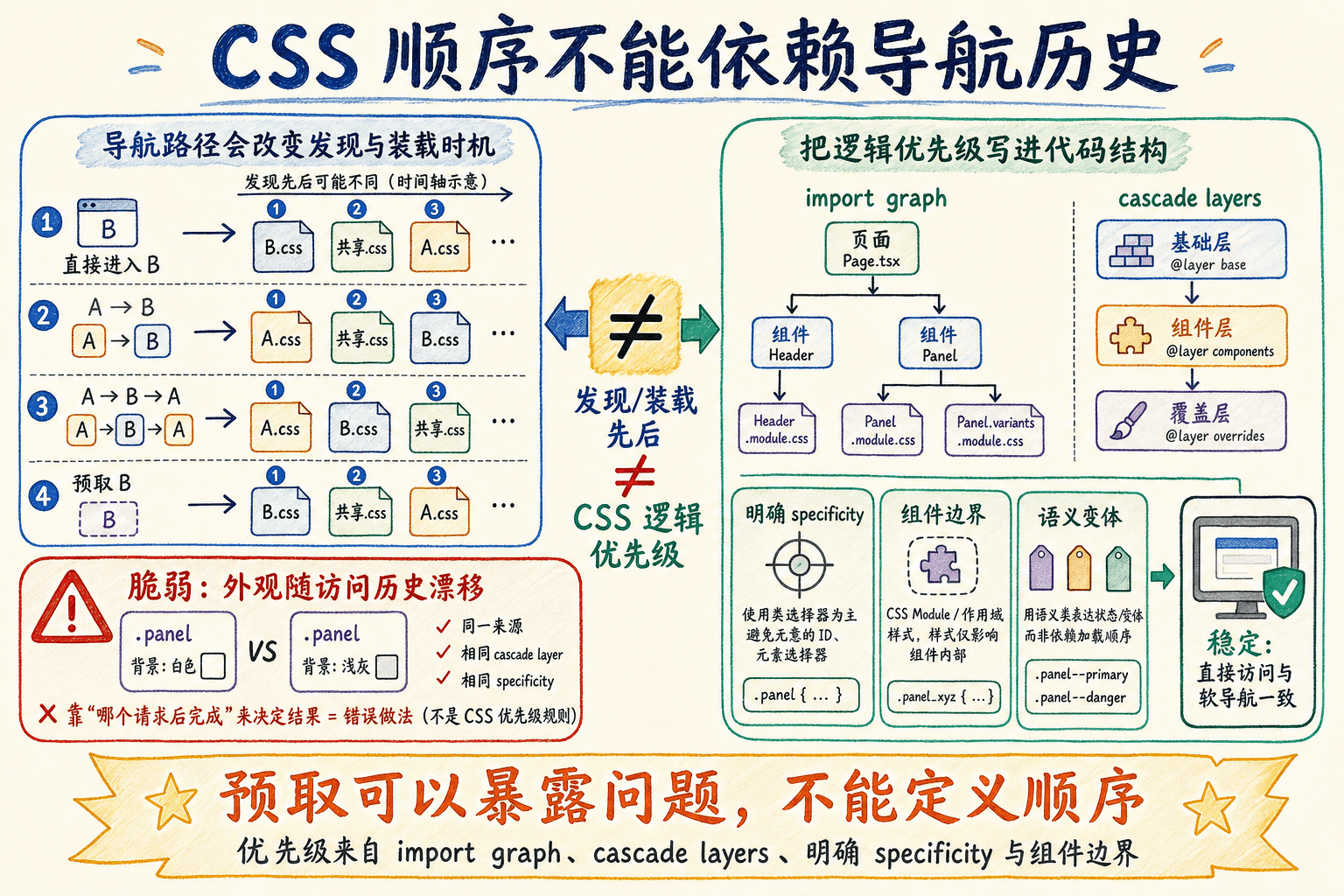
下面的实验台会模拟直接进入、A→B、A→B→A 和预取开关。重点是观察全局规则集合与 cascade,而不是把模拟结果当成 Next.js 内部网络实现。
cssChunking 不是第一颗药
Next.js 提供实验性的 CSS chunking 配置。当前仓库没有设置它,仍沿用默认的 true。下面只展示遇到已确认顺序依赖时的排查写法,不是建议直接加入现有配置:
ts
// next.config.ts
import type { NextConfig } from 'next'

const nextConfig: NextConfig = {
  experimental: {
    // 排查示意:更严格的顺序会增加 chunk 和请求
    cssChunking: 'strict',
  },
}

export default nextConfigtrue是默认值,会在分析显式与隐式依赖后尽量合并,减少请求;false不主动合并或重排;'strict'更严格地保留导入顺序,但会产生更多 chunk 和请求。
这项功能仍是实验项。只有确认两个文件确实存在不可消除的顺序依赖时,才考虑用 'strict' 验证;长期方案仍应是消除相反导入顺序、局部化规则或用 layer 明确关系。
7
如果页面样式只在开启 Link 预取时出错,就说明 CSS 的正式优先级由预取请求完成顺序决定。
CSS-in-JS 在 Server Components 里有明确边界
“Next.js 不支持 CSS-in-JS”过于绝对。官方列出了多种能在 app 目录的 Client Components 中工作的库,包括 styled-jsx、styled-components 和若干组件系统。真正的限制是:运行时 CSS-in-JS 必须适配 React 并发渲染、Server Components 和 Streaming,不能沿用只为传统单次 SSR 设计的注入方式。
对于 App Router,典型集成需要三部分:
- 一个 style registry 收集当前服务器渲染产生的规则;
useServerInsertedHTML在依赖内容出现前把规则插入 HTML;- 一个 Client Component 在初始服务器渲染期间包住需要收集的子树。
styled-jsx registry
styled-jsx 在 Client Components 中至少需要 5.1.0。当前仓库实际解析到 5.1.6。registry 可以这样写:
tsx
// app/styled-jsx-registry.tsx
'use client'

import { useState, type ReactNode } from 'react'
import { useServerInsertedHTML } from 'next/navigation'
import { StyleRegistry, createStyleRegistry } from 'styled-jsx'

export function StyledJsxRegistry({ children }: { children: ReactNode
根布局使用 registry:
tsx
// app/layout.tsx
import type { ReactNode } from 'react'
import { StyledJsxRegistry } from './styled-jsx-registry'

export default function RootLayout({ children }: { children: ReactNode }) {
  return (
    <html lang="zh-CN">
      <
具体使用 styled-jsx 的组件仍是 Client Component:
tsx
'use client'

import { useState } from 'react'

export function FavoriteButton() {
  const [saved, setSaved] = useState(false)

  return (
    <button
      className="favorite"
      aria-pressed={saved}
      onClick={()
registry 是客户端边界,但不是全树客户端化
StyledJsxRegistry 模块带有 'use client',因为它使用 state 和 useServerInsertedHTML。根布局把服务器生成的 children 作为插槽传给它,并不会让所有页面模块都变成客户端依赖。真正使用 styled-jsx、浏览器事件或运行时主题 API 的组件才需要进入客户端图。
服务器渲染时,registry 会把收集到的规则刷进 head;流式渲染的后续 chunk 继续追加规则;水合完成后,再由 CSS-in-JS 库接管客户端动态样式。少了 registry,常见结果就是首屏无样式、流式内容到达后才补规则,或者服务器和客户端生成顺序不一致。
什么时候值得承担运行时成本
如果规则可以由 Tailwind、CSS Modules 或普通 CSS 在构建时确定,静态 CSS 通常更符合 Server Components 的目标:无需为样式发送额外运行时代码,也无需维护 registry。
CSS-in-JS 更适合这些情况:
- 项目已经使用且必须保留一个支持 App Router 的组件库;
- 样式规则真的由客户端运行数据生成,而不仅是切换几个预定义状态;
- 团队愿意测试 Streaming、hydration、CSP 和客户端包成本;
- 所选库的当前版本明确支持 React 19 与并发渲染。
不要仅仅因为“样式和组件写在一起看着方便”,就把本来能静态抽取的整套界面迁入运行时。
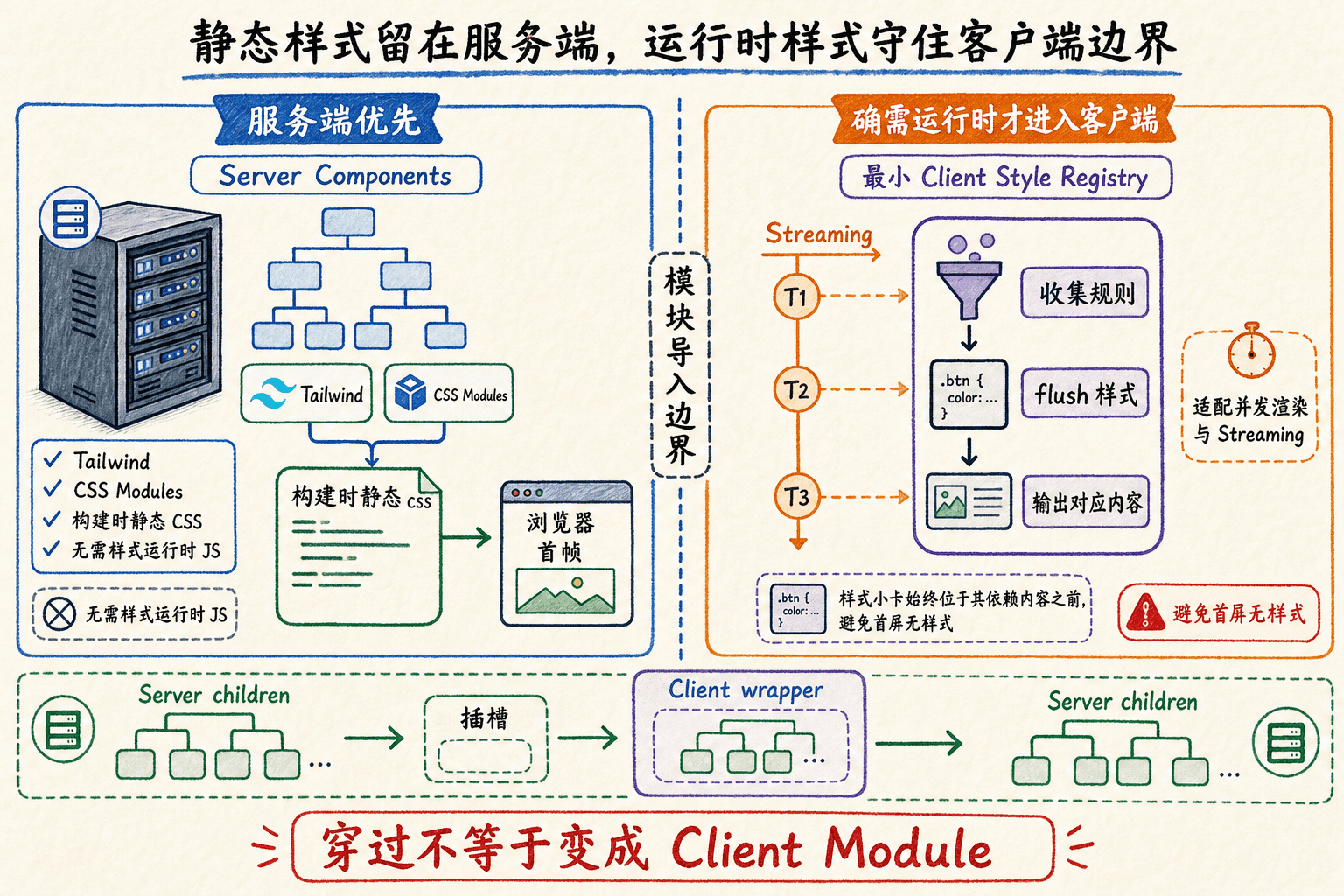
8
App Router 中运行时 CSS-in-JS 的 style registry 主要负责哪些事情?
响应式组件不只看视口
传统 Media Query 根据 viewport 判断布局,适合页面级导航、整体栏数和全屏结构。但 ProjectCard 既可能放在 280px 的侧栏,也可能放在 900px 的主内容区。此时浏览器窗口一样大,组件实际可用空间却完全不同。
Tailwind 断点是 mobile-first
Tailwind 的无前缀 utility 对所有尺寸生效,sm: 从 40rem 及以上生效。sm: 不是“只给手机”:
tsx
import type { ReactNode } from 'react'

export function ProjectGrid({ children }: { children: ReactNode }) {
  return (
    <div className="grid grid-cols-1 gap-4 md:grid-cols-2 xl:grid-cols-3">
      {children}
    </div>
  )
}
这里手机默认一列,48rem 以上两列,80rem 以上三列。想限定某个区间,可以组合 md:max-xl:*;不要先写桌面样式,再用一串 max-width 逐级撤销。
Container Query 看组件拿到的空间
普通 CSS 可以把卡片设成 inline-size container:
css
.card {
  container-name: project-card;
  container-type: inline-size;
  display: grid;
  gap: 0.75rem;
}

@container project-card (min-width: 30rem) {
  .cardBody {
    display: grid;
    grid-template-columns: minmax(0, 1fr)
Tailwind v4 已内置基础 Container Query,不需要旧的 @tailwindcss/container-queries 插件:
tsx
export function AdaptiveProjectCard({ name }: { name: string }) {
  return (
    <article className="@container rounded-2xl border border-bc-100 bg-back-200 p-4">
      <div className="grid gap-3 @md:grid-cols-[minmax(0,1fr)_auto] @md:items-center">
        <div className="min-w-0">
          <h3 className="truncate font-semibold text-primary"
这张卡片放进窄侧栏时上下排列,放进宽主区时才改为左右布局。组件不需要知道当前路由,也不需要 JavaScript 监听 window.innerWidth。
响应式还包括输入方式和用户偏好
只适配宽度还不够。交互样式至少要覆盖:
- 键盘焦点:使用明显的
focus-visible样式; - 触摸设备:不能把关键信息只藏在 hover;
- 深浅主题:两套背景上都满足对比度;
- 减少动态效果:移除非必要位移、旋转和持续动画;
- 文本放大:200% 缩放时不截断操作按钮和正文。
一个按钮可以这样处理:
tsx
export function OpenProjectButton() {
  return (
    <button className="rounded-lg bg-accent px-3 py-2 text-white-100 transition-transform hover:-translate-y-0.5 focus-visible:outline-2 focus-visible:outline-offset-2 focus-visible:outline-accent motion-reduce:transform-none motion-reduce:transition-none">
      打开项目
    </button>
  )
}
motion-reduce 取消位移和过渡,但按钮仍通过文字、背景和焦点环表达状态。不要简单使用 * { animation: none !important },因为进度反馈或空间关系变化有时仍需要一个不引发不适的替代呈现。
正文常规尺寸的前景/背景对比度应至少达到 4.5:1,大号文字至少 3:1。焦点指示也需要有足够面积和对比度。颜色不能成为唯一信号:活跃项目除了绿色圆点,还应有“活跃”文本或对辅助技术可读的状态。
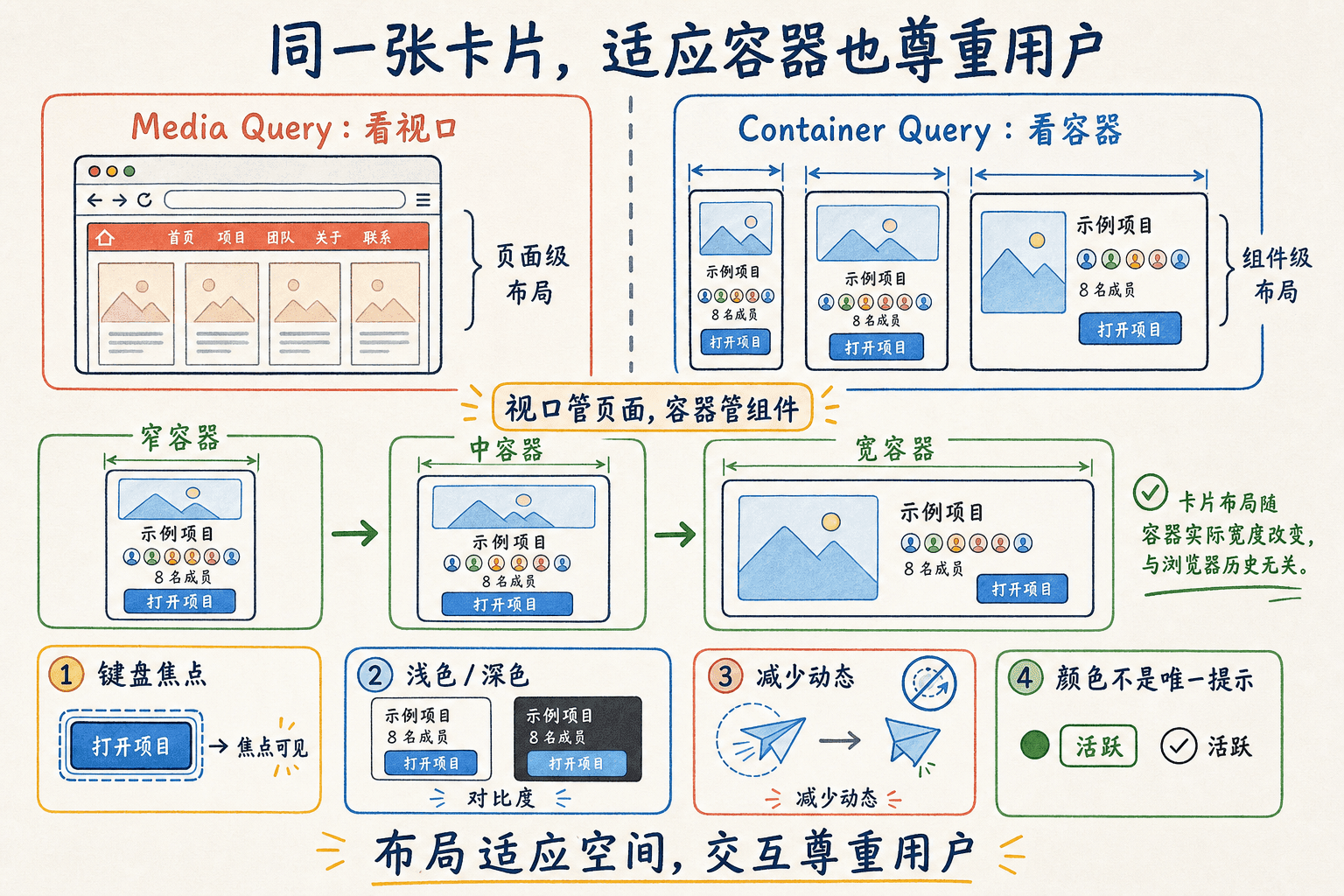
下面可以独立改变 viewport 与卡片容器宽度,并切换主题、减少动态效果和键盘焦点。观察 Media Query 与 Container Query 分别响应哪个输入。
9
让同一张项目卡在窄侧栏纵向排列、在宽主区横向排列,哪些做法合理?
避免首次绘制闪烁和布局跳动
FOUC 是内容先以错误或无样式状态出现,随后样式到达再改变外观。CLS 关注的是用户没有主动触发时,页面元素在不同帧之间发生意外位移。两者可能同时出现,但修复思路不同。
关键样式要在首次绘制前可用
Next.js 会在生产构建中抽取并加载静态 CSS。全局入口、Tailwind 和 CSS Modules 只要通过正常 import 进入依赖图,就不应该等到组件 useEffect 后才补上。
这些做法容易制造闪烁:
- 组件挂载后才动态
import()首屏关键 CSS; - 在 Effect 里给根元素补深色 class;
- CSS-in-JS 没有服务器 registry;
- 远程 stylesheet 没有明确加载与 precedence 策略;
- 服务器渲染浅色内容,客户端第一次渲染却立即输出另一套结构。
主题必须在浏览器绘制前决定
手动主题来自 localStorage 时,服务器通常不知道用户上一次选择。next-themes 会注入初始化脚本,在页面其余内容绘制前更新根元素 class。当前根布局因为 .dark 由客户端在已知条件下修改,所以只在 <html> 上使用:
tsx
<html lang="zh-CN" suppressHydrationWarning>
  <body>{children}</body>
</html>
suppressHydrationWarning 只作用一层,而且是逃生口,不是“关闭所有 hydration 检查”。如果组件在服务器输出“浅色”,客户端第一次输出“深色”,仍应调整渲染逻辑,而不是继续向内层元素添加 suppress。
当前项目还使用一个 beforeInteractive 的 ThemeInit 初始化强调色 CSS 变量。它和 next-themes 分工不同:前者在首次绘制前恢复用户选择的强调色,后者决定浅色、深色或跟随系统。两者都不应推迟到组件挂载后的普通 useEffect。
如果主题存在服务器可读 cookie,也可以在服务器直接输出 class,减少首屏不确定性。选择哪条路径取决于是否需要静态输出、缓存怎样区分主题,以及团队愿意维护哪种状态来源。
给异步内容预留稳定空间
项目卡片的缩略区域和加载骨架应该与真实内容使用相同几何约束:
css
.thumbnail {
  aspect-ratio: 16 / 9;
  inline-size: 100%;
  overflow: clip;
  border-radius: 0.75rem;
  background: var(--background-tertiary);
}

.card,
.cardSkeleton {
  min-block-size: 12rem;
不要先渲染一个 40px 高的“加载中”,数据到达后突然替换成 300px 卡片。骨架不必像素级复制内容,但应保留相近的区域、行数和操作位置。
图片的 width、height、fill、sizes 和优化管线会在下一章展开;这里先记住 CSS 层的职责是让图片容器在资源到达前就有可预测尺寸。字体加载同样可能改变文字度量,具体的 next/font 方案也留到下一章。
动画优先改变不参与布局的属性
transform 和 opacity 通常不会推动周围元素重新排版,适合卡片进入、悬停和状态过渡。持续改变 width、height、top 或大段文本尺寸,既容易触发布局,也更可能让减少动态效果用户不适。
本章只建立“哪些样式会导致闪烁和位移”的因果链。CSS 体积、Core Web Vitals 测量、bundle 分析和生产指标会在性能优化章节系统处理,避免这里把“看起来更快”当成已经测量过的结论。
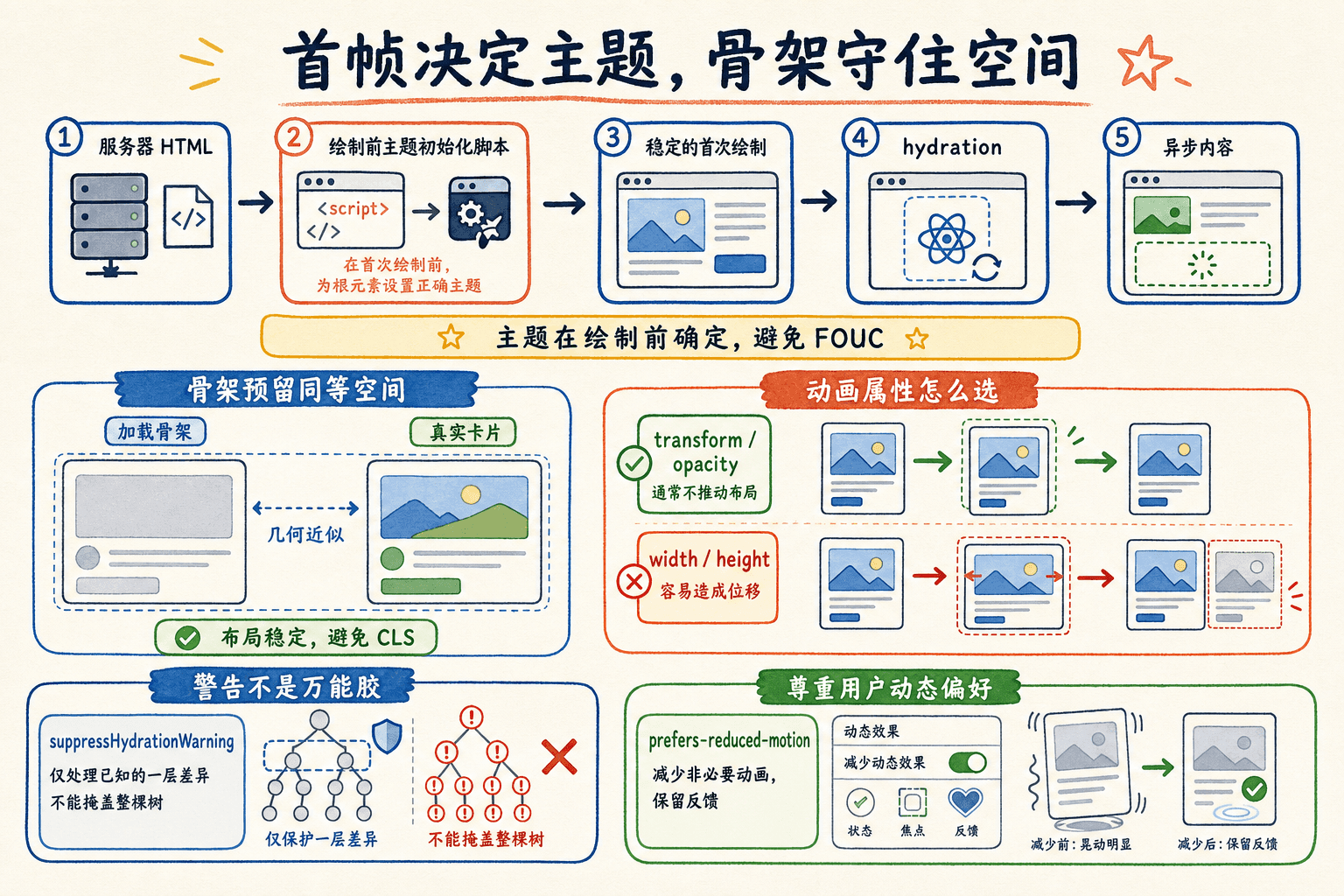
10
为了消除 hydration 警告,可以在整棵页面树上广泛添加 suppressHydrationWarning。
给当前项目划一条混用边界
结合仓库现状,我建议采用“全局 token + Tailwind 主体 + 少量 CSS Modules”的结构。它不是所有项目的唯一答案,但和当前依赖、团队已有代码以及 Server Components 模型最匹配。
text
app/
├── globals.css                 # Tailwind 入口、语义 token、基础规则
├── layout.tsx                  # 全局 CSS 与主题 Provider
└── workspace/
    └── projects/
        └── page.tsx            # 组合页面,不导入页面专属全局 CSS

components/
└── projects/
    ├── ProjectCard.tsx         # Tailwind 主布局与状态映射
    └── ProjectCard.module.css  # 只有复杂局部规则需要时才创建

postcss.config.mjs              # @tailwindcss/postcss
next.config.mjs                 # 不用 CSS 配置掩盖作用域问题
方案选择可以按这张表执行:
用一套步骤完成 ProjectCard
先列出跨组件共享的语义:主背景、卡片背景、主要文本、次要文本、边界、强调色和状态色。把具体颜色放进 :root 与 .dark,不要先写进卡片。
用顶层 @theme inline 把需要在 Tailwind 类中使用的语义变量映射到 --color-* 命名空间,并保留当前项目的 class 深色 variant。
在 ProjectCard.tsx 中用 Tailwind 完成普通布局、间距、颜色、焦点和 reduced-motion。状态 prop 映射到完整静态类名,避免字符串拼接。
真正由数据决定的进度值可以通过 CSS 变量传递:
tsx
import type { CSSProperties } from 'react'

type ProjectProgressProps = {
  value: number
}

export function ProjectProgress({ value }: ProjectProgressProps) {
  const safeValue = Math.min(100, Math.max
这里动态的是一个受约束的百分比,不是整套 CSS 字符串。轨道、颜色、圆角和 reduced-motion 仍由静态类控制,辅助技术也能读到数值。
常见故障按症状排查
样式问题最怕一上来就加 !important。先根据症状缩小到“扫描、作用域、顺序、主题、容器还是运行时注入”。
一次可重复的检查顺序
- 在浏览器 Computed 面板确认最终值,以及哪条规则覆盖了它。
- 查看匹配规则属于 global、Module、Tailwind 还是运行时
<style>。 - 如果类根本没有规则,检查 Tailwind 扫描和 CSS import;如果有规则但被覆盖,检查 cascade。
- 分别直接访问、软导航进入、返回再进入,观察 stylesheet 集合。
- 切到生产构建复现,不把 Fast Refresh 行为当作最终结果。
- 模拟深色、减少动态效果、键盘焦点和不同容器宽度。
- 最后才评估是否需要
cssChunking: 'strict'、增加 specificity 或引入新的样式工具。
!important 可以暂时让一条声明获胜,却不会告诉后来维护者它在和哪一层竞争。当前项目已经使用 Tailwind 的 layer、语义 token 和局部组件边界,应先修正规则所有权。只有第三方不可控样式等明确边界才考虑有限使用 important。
综合练习:完成自适应项目卡
现在给项目协作台补齐 ProjectCard。需求如下:
- 在侧栏和主区域复用同一个组件;
- 窄容器上下排列,宽容器左右排列;
- 支持“活跃、暂停、归档”三种状态;
- 每个状态都有文字,不只依赖颜色;
- 浅色和深色主题都可读;
- 收藏按钮有键盘焦点;
- 减少动态效果时取消位移和进度动画;
- 不动态拼接 Tailwind utility;
- 不建立页面专属全局
.card; - 直接打开和跨路由软导航的外观一致。
可以先写出数据类型和静态映射:
tsx
const statusStyles = {
  live: {
    label: '活跃',
    className: 'bg-success/15 text-success',
  },
  paused: {
    label: '暂停',
    className: 'bg-warning/15 text-warning',
  },
  archived: {
    label: '归档',
    className: 'bg-back-300 text-secondary',
然后再决定哪些内容属于全局 token、哪些由 Tailwind 表达、是否真的需要 Module。
11
下列哪些内容适合留在 app/globals.css?
12
生产环境里两个同权重 CSS 规则顺序异常,最先应该做什么?
13
减少动态效果开启时,哪些调整更合理?
把样式当成可检查的依赖
完成这一章后,我们不需要为项目宣布一个永远不变的“唯一 CSS 方案”。更重要的是,每条规则都能回答三个问题:它属于谁、什么时候进入页面、靠什么覆盖或变化。
当前项目的落点很明确:全局 CSS 管 Tailwind 入口和语义 token,Tailwind 处理大部分布局与状态,CSS Modules 补充复杂局部规则;Sass 只有在真实旧资产需要时才安装,运行时 CSS-in-JS 只有在支持 App Router 的客户端场景才引入 registry。响应式优先从 mobile-first 和组件容器出发,主题、焦点与 reduced motion 从一开始就进入验收,而不是最后补丁。
最后用这组问题检查自己的页面:
- 从另一个路由进入,样式是否仍和直接刷新一致?
- 生产构建是否和开发环境一致?
- Tailwind 类是否以完整字符串存在于可扫描源码?
- 深浅主题是否在首次绘制前确定?
- 卡片在不同容器中是否自行适配?
- 键盘焦点、状态文字和减少动态效果是否仍然可用?
- 某个值若改动,能否在一个明确 token 或组件边界内完成?
这些问题都能回答清楚,样式就不再是一堆“当前看起来没问题”的覆盖,而是一组可以追踪和验证的依赖。下一章会把图片、字体和静态资源接进这套布局,并继续处理资源尺寸与加载行为;后面的性能优化章节再用生产数据衡量 CSS 和资源成本。